Known Participant
January 4, 2018
Answered

Outlined Text Trouble in AI

  • January 4, 2018
  • 3 replies
  • 3057 views

Hello!

Wondering if anyone's run into the issue I'm having. When I outline text in Illustrator and then save my file as a PDF my text is distorting. As you can see below... the L's are thicker than the rest of the text. Does anyone know why this might be happening?
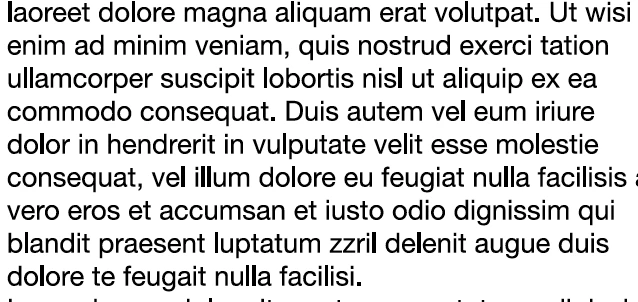
Additional info: I'm using Adobe Illustrator CC 2017 on a Mac.

I created text. Highlighted it. and created an outline by doing Command + shift + o. Then 'save as' a PDF.

Would love any insight on how to avoid this issue! and I wish I could just not outline the text (because then the export looks perfectly fine) but I have to outline it. No one else seems to be having this issue except me and I'm wondering if there's some setting in illustrator that I need to change?

Thanks!
This topic has been closed for replies.
Correct answer Mike_Gondek10189183

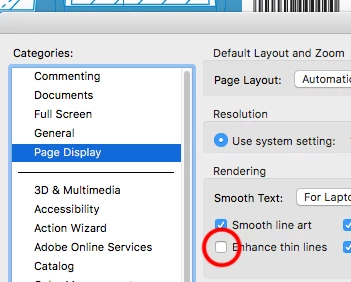
This an issue with your Acrobat settings. Turn enhance thin lines off and you should be good.

Why must you outline your text for a .pdf? Are they printing final plates from the .pdf, they should not have to have the fonts outlined

3 replies

Known Participant
January 4, 2018

Thank you this worked!

Mike_Gondek10189183
Community Expert
Community Expert
January 9, 2018

Glad to hear that, for my part you are welcome.

Mike_Gondek10189183
Community Expert
Mike_Gondek10189183Community ExpertCorrect answer
Community Expert
January 4, 2018

This an issue with your Acrobat settings. Turn enhance thin lines off and you should be good.

Why must you outline your text for a .pdf? Are they printing final plates from the .pdf, they should not have to have the fonts outlined

Monika Gause
Community Expert
Community Expert
January 4, 2018

Don't outline text. That's what font ambedding is for.

What's happening is an "enhancement" that Acrobat applies.