



Outlining shapes to connect them creates unexpected "open" patterns
Hello! Apologies if I’m not using the correct terminology.
I’m using illustrator to create the files that I use with a laser cutter, and in order to minimize superfluous cutting I use “outline" in the pathfinder window to connect pieces. I’m encountering an issue that I’ve never encountered.
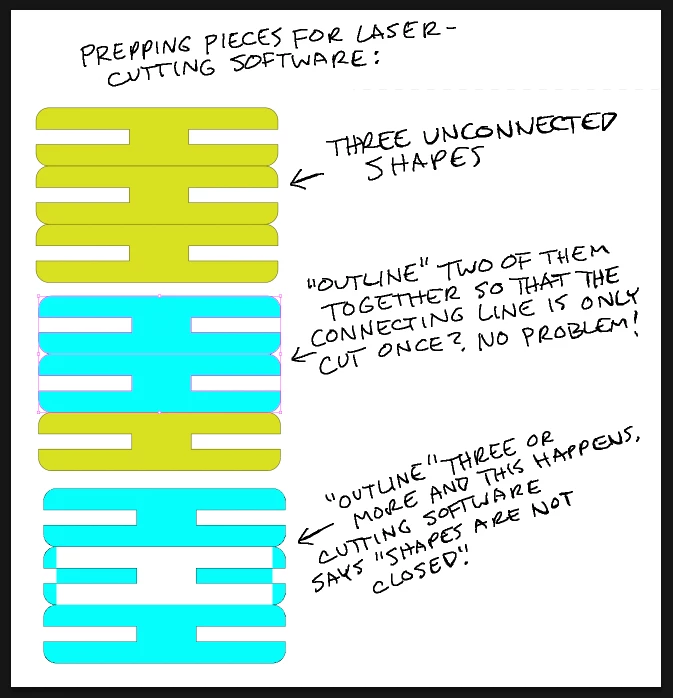
Outlining two of the shapes creates no issues, but if I outline three it changes what seems to count as inside and outside of an otherwise closed shape. The cutting software can’t cut saying that (paraphrasing) the file includes shapes that aren’t closed.
I thought that maybe if I opted not to align the side edges, maybe that would circumvent the problem, but it didn’t:
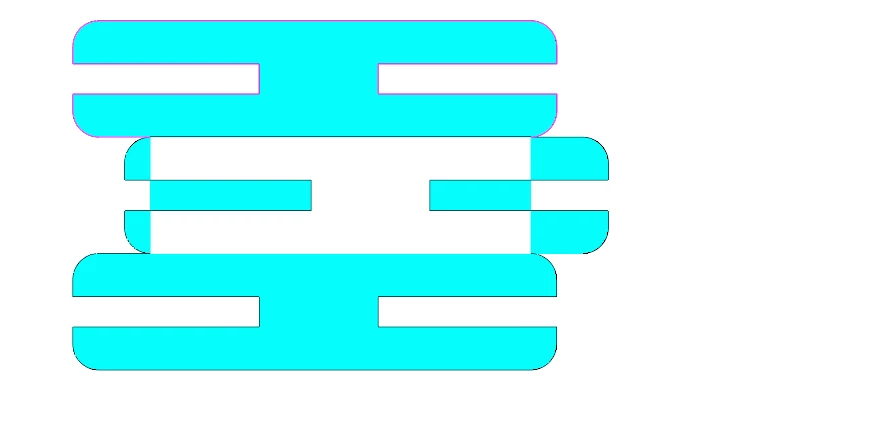
One thing that might be of note: the stroke is aligned to “center” on all three shapes in the stroke window, as are the cap and corner, but once I outline it the cap and corner stay centered and the stroke alignment moves to “inside” alignment (the left box).
I can work around this by creating batches of two pieces with a little bit of space in between, but I’d love to understand why this is going wrong for me and how to fix it for the future. Any help would be appreciated!
 AdChoices