
Participating Frequently
August 29, 2020
Answered

Outward Contour copied from Adobe Xd to Illustrator not working

  • August 29, 2020
  • 2 replies
  • 384 views

Hello Adobe Support Community,

when copying something from Adobe Xd to Illustrator, the "Outward Contour" isn't transferred correctly:
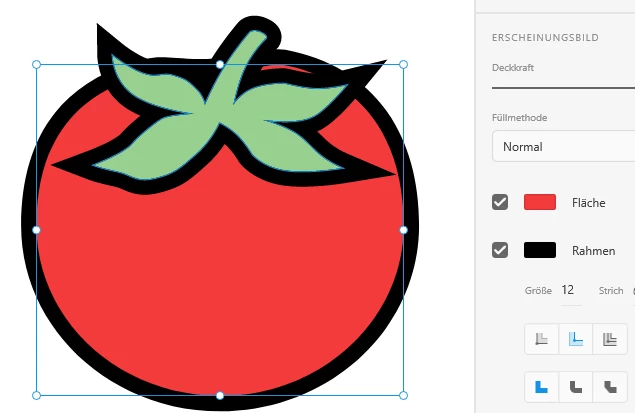



However, when setting an Outward Contour in Illustrator, copying it from Illustrator -> Xd works fine.


Am i missing an option here?


Cheers
 

This topic has been closed for replies.
Correct answer carlosgarro

Hi.

Set the strokes to "center" before copying

Then align them to the required position in Illustrator.

2 replies

carlosgarro
Community Expert
carlosgarroCommunity ExpertCorrect answer
Community Expert
August 30, 2020

Hi.

Set the strokes to "center" before copying

Then align them to the required position in Illustrator.

ainigmaAuthor
Participating Frequently
August 30, 2020

Hi carlosgarro,

i appreciate the workaround and it works, thanks for that. However, when copying ~100 forms in nested groups i can't reliably do that for all of them. I really hope to see a solution from Adobe there 🙂

Kurt Gold
Community Expert
Community Expert
August 29, 2020

I think you are right and you are are not missing some options.


Both applications are not reliably compatible when copying and pasting objects from one into the other application.


Some (or many) things will have to be corrected manually.