
Participant
April 7, 2020
Answered

Overlapping objects illusion

  • April 7, 2020
  • 3 replies
  • 1446 views

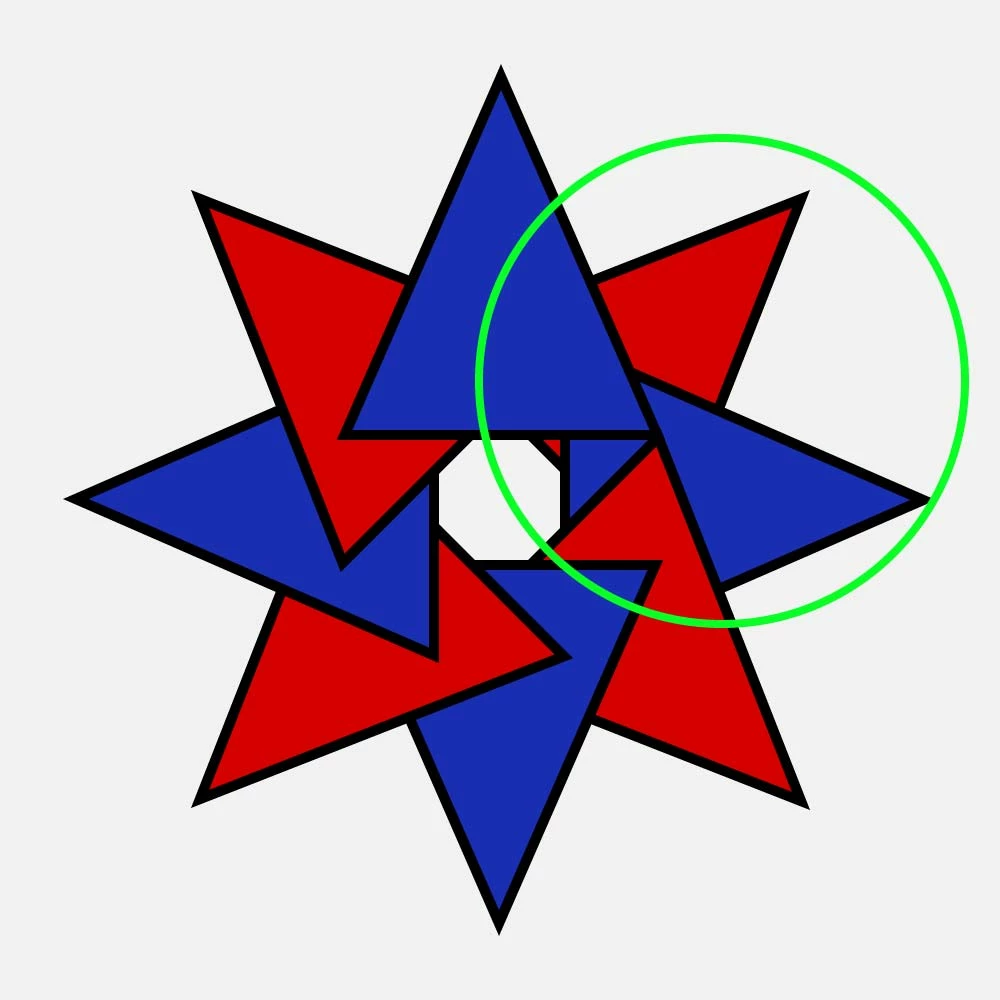
I am trying to make these triangles overlap each other in a consistent manner all the way around. I am new to illustrator and I don't know the tricks of the trade yet.

What I want to do is make the last two triangles within the green to overlap the top blue triangle. I have tried shape builder but it doesn't work like I thought it would.

Any ideas would be appreciated. Thanks in advance.
 

This topic has been closed for replies.
Correct answer Jacob Bugge

awasis,


You ought to be able to do it with the Shape Builder Tool,

https://helpx.adobe.com/illustrator/using/creating-shapes-shape-builder-tool.html
https://helpx.adobe.com/illustrator/atv/cs5-tutorials/creating-complex-art-with-the-shape-builder-tool.html


But you can also just use your rotation way in two rounds:


1) In the first round, create the topmost triangle and rotate just 1 copy (clockwise 45 degrees), then select both and Pathfinder>Minus front to cut out the overlap from the topmost triangle,

2) In the second round, starting with the cut topmost cut triangle rotate 7 copies (clockwise or anticlockwise 45 degrees),

3) Change the Fill Color of every second cut triangle.


3 replies

Jacob Bugge
Community Expert
Community Expert
April 8, 2020

Thank you for sharing, awasis.


I believe that you may be able do it (next time) in one go if you start out with stroke/nofill paths and add the fill(s) later (maybe I ought to have mentioned it, sorry).


Jacob Bugge
Community Expert
Community Expert
April 7, 2020

You are welcome, awasis.


May I ask which way you used (my guess being the Shape Builder)?


Participant
April 7, 2020

I had to do it in layers. I had to do it twice, once with the stroke and once without. I resized the one without the stroke. I had to do the same with the top red triangle on the right but only once since it was covered by the blue one. Obviously, I had to manipulate where it was in perspective too.


Jacob Bugge
Community Expert
Jacob BuggeCommunity ExpertCorrect answer
Community Expert
April 7, 2020

awasis,


You ought to be able to do it with the Shape Builder Tool,

https://helpx.adobe.com/illustrator/using/creating-shapes-shape-builder-tool.html
https://helpx.adobe.com/illustrator/atv/cs5-tutorials/creating-complex-art-with-the-shape-builder-tool.html


But you can also just use your rotation way in two rounds:


1) In the first round, create the topmost triangle and rotate just 1 copy (clockwise 45 degrees), then select both and Pathfinder>Minus front to cut out the overlap from the topmost triangle,

2) In the second round, starting with the cut topmost cut triangle rotate 7 copies (clockwise or anticlockwise 45 degrees),

3) Change the Fill Color of every second cut triangle.


Participant
April 7, 2020

Thanks so much. 🙂