

Luke Jennings
Inspiring
June 21, 2017
Question

Overprinting Process White

  • June 21, 2017
  • 1 reply
  • 1496 views

This question originated in the Printing & Prepress Forum, but I wanted to expand it here, as I think some people will find the info useful.

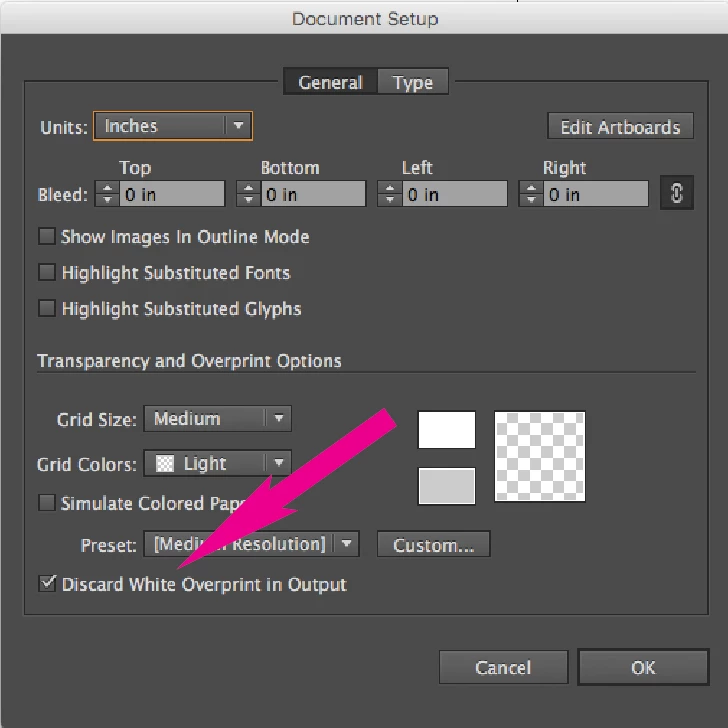
A file saved from Illustrator CS6 with overprinting white fill will display correctly in Acrobat DC (the white fill will overprint the background), but the same file saved from CC or newer will KO (knock out) the background. Multiply still works as expected. Starting with version CC (17) a new "enhancement" was added that forbids overprinting process white by default, this can be turned off in the document setup dialog or in the print dialog.
    This topic has been closed for replies.

    1 reply

    Monika Gause
    Community Expert
    Community Expert
    June 21, 2017

    Starting with version CC (17) a new "enhancement" was added that forbids overprinting process white by default, this can be turned off in the document setup dialog or in the print dialog.

    There is no setting that forbids white overprint. It's far more complicated.

    In the actual working AI file you can still create white overprinting elements. Sometimes you get a warning, sometimes you don't.

    The setting will only delete the overprinting for process white elements in the output file (EPS, PDF, print and in the embedded PDF inside an AI file). It will do so without notice. And it will do so for old files. So your files will have different content in both its parts.

    Please watch this video about Illustrator files: Mysterious things Illustrator does - Saving files on Vimeo

    So incase you have created process white overprinting elements on purpose, you will need to be careful.

    Luke Jennings
    Inspiring
    June 21, 2017

    Thanks, I'll watch the video when I have a moment.

    So, how do you make process white fill overprint the background, in V17 or newer, without using multiply, using the default setting?

    With the .ai file displayed in Acrobat, or placed into InDesign?

    Monika Gause
    Community Expert
    Community Expert
    June 21, 2017

    You can just set it up in Illustrator.

    Uncheck this export setting, so that the overprint is preserved when saing the EPS or PDF.