
Known Participant
October 2, 2021
Question

Pantone colour in Illu cc 2017

  • October 2, 2021
  • 2 replies
  • 531 views

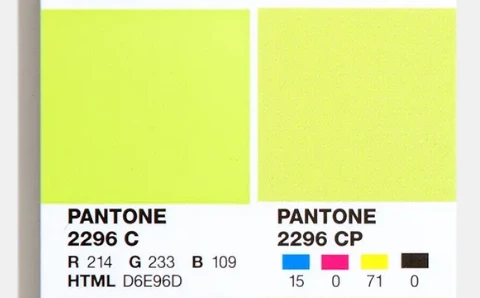
What is the case with PantoneColors and older versions of Illustrator? In Illu CC 2017 for example, im trying to locate the 2296C Pantone colour (as seen in Pantone's site) and its no were to be found in the Bridge Color book.
This topic has been closed for replies.

2 replies

Brad @ Roaring Mouse
Community Expert
Community Expert
October 3, 2021

If you just want to use that as a spot colour in your artwork now, just create a new spot color of your own with that name "PANTONE 2296 C" and define it using the RGB* value from the Pantone site (as you have in your screen grab). If your goal is to separate this colour out as a spot colour anyway, this is sufficient. You printer's RIP will still spit out a separate plate for the spot colour, and they already know what the ink formula is anyway.

If you know you are printing to process, might as well just create a new swatch with the CP values at right (Color Bridge coated)


*Normally, Pantone spot swatches are in LAB mode, which is best, but the next fallback solution is to use RGB which will be darn close.

Ton Frederiks
Community Expert
Community Expert
October 2, 2021

For newer versions there is the Pantone Connect extension. For Older versions you need the Pantone Color Manager, both from Pantone.