


BarryRowell
Inspiring
July 10, 2026
Answered

Pantone Connect not adding some colors but adding others

  • July 10, 2026
  • 1 reply
  • 31 views

I am updating an old document and the color palette shows the PMS colors with CMYK preview. This is “probably” all right but when I use Pantone Connect to add the colors again using the spot color, they won’t update. I can add a new PMS color but I’ve tried putting the art into a new document, making a color swatch in a blank document, and several other options and nothing is work.


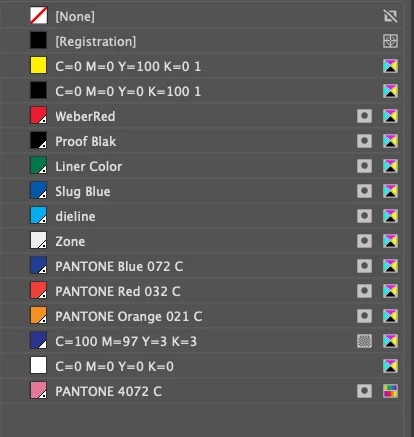
In the screenshot below, the Pantone colors on top are what were already in the document (2016) and the CMYK equivalent is what happens when I click on Add to Swatch from Pantone Connect but the color below (PANTONE 4072 C) adds as I would like these other colors to be in the document (see preview icon on the right).

Any idea what might be happening here? The document is CMYK but that shouldn’t prevent me from adding PMS colors to it (at least, it never has before).
 

    Correct answer BarryRowell

    It appears to have worked when I opened another file in the same series that had the PMS colors correct. I pasted my art into that layout and I have what I need now. Thanks for your help!

    1 reply

    Bill Silbert
    Community Expert
    Community Expert
    July 11, 2026

    In my experience using PANTONE colors I have found that PANTONE has periodically changed their CMYK breakdowns without any notice to the consumer. In other words whatever way the colors broke down to CMYK in 2016 there is virtually no way that they will breakdown that way in 2026. I think that you are better off deleting the older colors and redefining them in your document(s). That way your colors will break down in the way that PANTONE is currently recommending. Your colors will then be good until such time that PANTONE decides to change the breakdowns again. But that’s  another story.

    BarryRowell
    Inspiring
    July 12, 2026

    I did try something like that which didn’t work and I considered replacing the PMS color with the 4072 in the screenshot above but the 072 is used in both outlines and fills for logos on multiple layers (it’s a label with a die line and while not complicated, there’s complexity to rebuilding and I was hoping to keep things simple. But I see what you’re suggesting and I can see a multi-step process to making it work in a new document.

    Billable time, I guess… nah, can’t do that to a good client.

    Thank you!

    BarryRowell
    BarryRowellAuthorCorrect answer
    Inspiring
    July 13, 2026

    It appears to have worked when I opened another file in the same series that had the PMS colors correct. I pasted my art into that layout and I have what I need now. Thanks for your help!