

Shlomit Heymann
Inspiring
September 24, 2023
Question

Paragraph Styles: Where has Paragaph Direction for Middle Eastern Version gone? (AI ME 2024)

  • September 24, 2023
  • 2 replies
  • 2639 views

Hello,

Problem is on Paragraph Style:

While under General on the left column I can see under "Indents and Spacing" that my Paragraph Direction is set to "Right to Left", I can't find this defintion where is should be, on the left colomn under "Indents and Spacing". It is missing.


Please see attached screen shot:
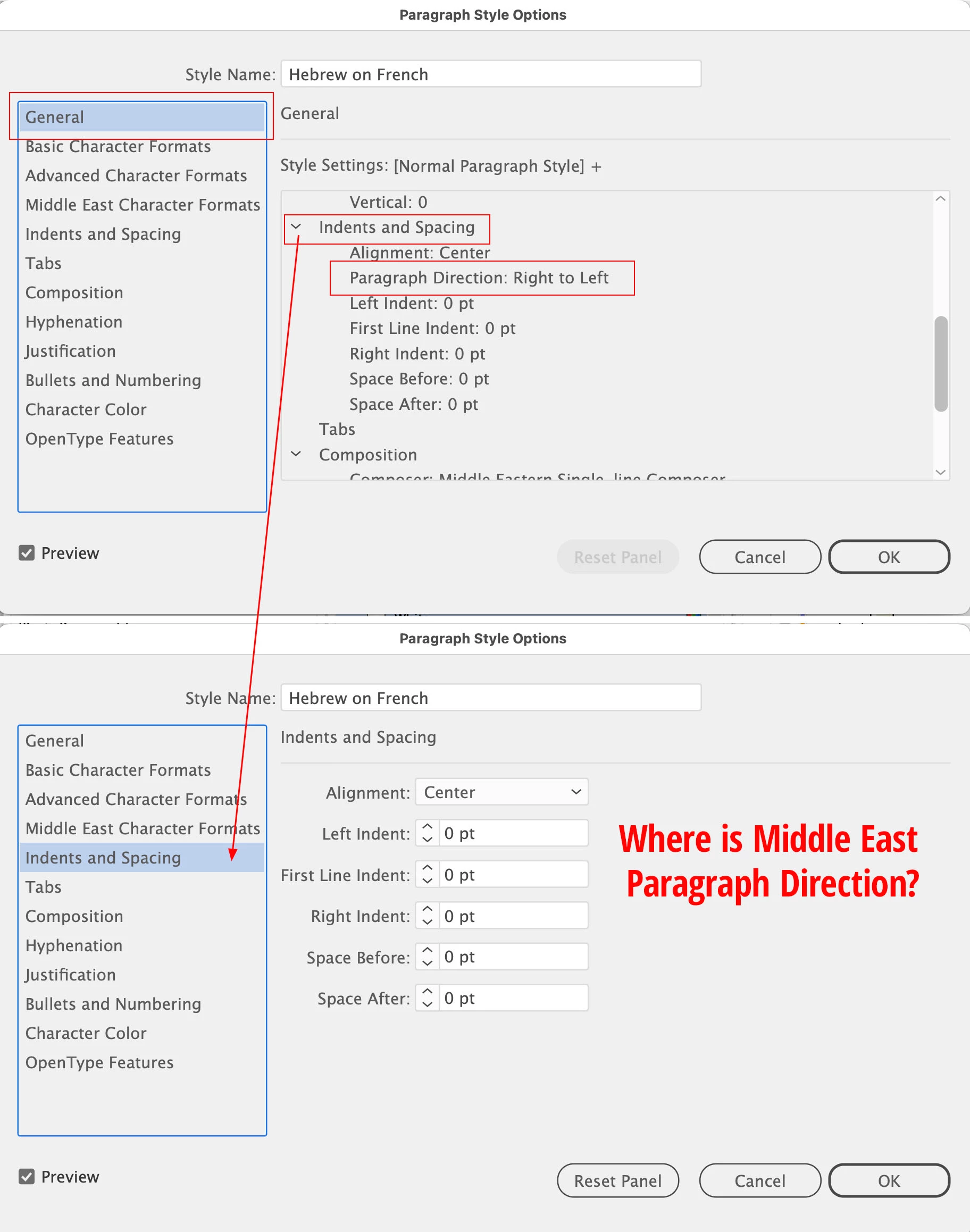
 

Adobe Illustrator Middle Eastern Version, 2024


Thank you

Shlomit

2 replies

Participant
April 17, 2024

היי שלומית ישנו עוד פתרון

אפשר לשמור קובץ בעברית מגוגל דוקס בפורמט
RTF
ואז את פותחת אותו באילוסטרייטור 

באילוסטרייטור את מגדירה את הפיסקה שפת מזרח  התיכון והכל מסתדר

תשמרי את הקובץ שיהיה תמיד כשצריך לכתוב בעברית

Shlomit Heymann
Inspiring
May 7, 2024

@makoregever Thank you but this is not a solution. This is a bug that needs to get fixed. It is missing from the menu of the Paragraph styeles options. I can find it in other place but no there so my problem is not to define it but that it is missing.

🙂

Anshul_Saini
Community Manager
Community Manager
January 24, 2025

Hello @Anubhav M 


I fail ot understand why you need all that.


We're now on version 2025. This option is still missing. It's just don't exist where is should be. I posted screehnshot that shows the problem but reading what you want means that you didn't undertand the problem.


Please Install the ME version and see it for yourself. Perhaps it's is best to ask the Middle Eastern version team instead of asking us to keep post soemthing that as someone who is famieler with the ME version should automatically know.


I posted this on Sep 24, 2023, now it's Jan 20, 2025. It's been enough time to investigate and fix this issure. Don't you think? 


I was really surprised when I installed 2025, It feels disrespect for all the Middle East community! Please pass it on. Don't we pay the same aount as the rest of the world? We should get a working application that supports our languages and not just part of. 


Thank you,

Shlomit


Hello @Shlomit Heymann,


I understand your concerns and appreciate the time you’ve taken to highlight this issue. I’m sorry for any confusion earlier, and I want to provide some clarification.


In the Middle Eastern version of Illustrator, the default paragraph style automatically uses the Middle Eastern composer (this is not a new change made in the recent version of Illustrator).
By design:

• The Indents & Spacing section picks up the direction based on the text tool used and the composer itself.

• Therefore, the Paragraph Direction option does not appear explicitly under Paragraph Styles > Indents & Spacing.


If you’d like to set a Left-to-Right Paragraph Direction, here’s a workaround:

1. Avoid using the Right-to-Left Type Tool for that text.

2. Use the regular Type Tool and switch the composer to Adobe Single-line Composer or Adobe Every-line Composer in the Paragraph panel.

3. Create a new Paragraph Style. In this case, the Left-to-Right Paragraph Direction will apply and appear under General but not under Indents & Spacing—this is expected behavior.


I hope this clarifies things and helps you work effectively. If there’s anything else you’d like addressed, feel free to share!


Best,

Anshul Saini

Monika Gause
Community Expert
Community Expert
September 24, 2023
Shlomit Heymann
Inspiring
September 24, 2023

Thank you but what do you mean?

I've installed The Middle Eastern version with all the Middle Eastern languages componants. It should appear there. It's not something that you need to "turn on"... or maybe I didn't understand your reply.


Paragraph Direction appears in the Paragraph panel, but not in the Pargraph style options and it should.


Thank you,

Shlomit

Monika Gause
Community Expert
Community Expert
September 24, 2023

I was referring to the Indic options. But maybe they are not there in a true ME version. Then probably you need to support this bug report: https://illustrator.uservoice.com/forums/601447-illustrator-desktop-bugs/suggestions/36365725-paragraph-panel-is-missing-text-direction-buttons?page=2&per_page=20


Someone in there could solve this for themselves with an older version, but it seems to be unsolved generally.