


Known Participant
July 10, 2025
Question

"Paste Remember Layers" not pasting to sublayers

  • July 10, 2025
  • 1 reply
  • 451 views

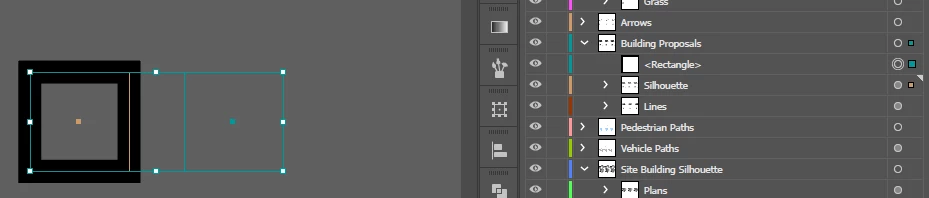
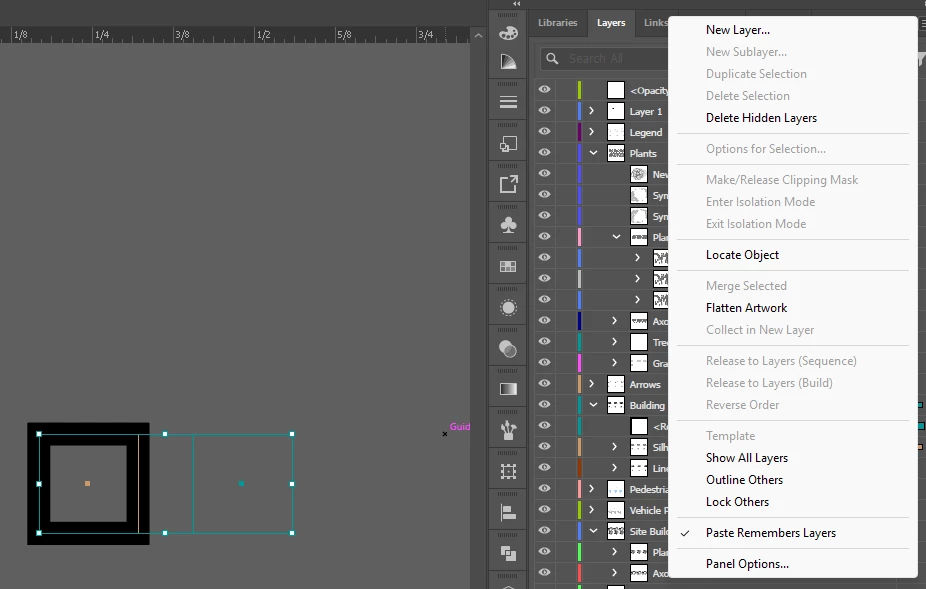
In my project I have several layers with sublayers for organization. I'm trying to copy objects between artboards while maintaing the object layers, so I have turned on "Paste Remember Layers." However, this only pastes the object to the highest most layer, not to the layer the object I copied is actually on. I've attached an image showing it.


I have selected the rectangle on the left which is from the "Building Proposals" > "Silhouette" layer and copy pasted it with "Paste Remember Layers" checked. However, it pasted to the parent layer "Building Proposals," not to the sublayer, which is where I want it.
 

Any help is great.


1 reply

Monika Gause
Community Expert
Community Expert
July 11, 2025

Works for me.

Did you already reboot the computer?


Do you have anything installed that "enhances" the clipboard?

dane_7051Author
Known Participant
July 11, 2025

Yes, I've restarted my computer, and I don't think I do. I don't have any plugins installed to my knowledge. All I have is the normal Illustrator download from the creative cloud launcher. I do have Windows clipboard history turned on, but I just tried turning it off and it made no difference, same behavior when pasting to sublayers. Just in case it helps, I'm running version 29.6.1.


dane_7051Author
Known Participant
July 11, 2025

I just went ahead and made a new file to test and.... it works in that file. I tried copy pasting all of the content from my other file into the new one and when all of my stuff is there, it doesn't work, but when I delete everything except for a small example, it starts to behave correctly? I've attached a link to a video I made of the behavior. Somehow it has something to do with all the other objects that I have in the scene, because when I delete them, even when I keep all the layers, the paste behavior returns to normal. I've also attached my working file becuase I think this is the only way I'll be able to show you what's happening. I think this is must be a bug. I can't image there is some setting that lives in one of my objects that is affecting my entire project file.


Thanks for the help.


https://youtu.be/CQQhMihV1ik

https://www.mediafire.com/file/wv3zfjumjukckxl/Copy_Paste_Bug_Example_Working_File.ai/file