
Booda2016
Participating Frequently
September 22, 2017
Answered

Pathfinder HELP - Simple Ibm like logo

  • September 22, 2017
  • 5 replies
  • 1241 views

I'm Trying to do some different practice logos. Well I'm completely baffled after googling, and practicing but I am unable to create striped text much like see in IBM Logo.

Any Help would be greatly appreciated.

Steps:

Created text

Created bars (also tried with line tool to no avail).

I then selected both (all)

pathfinder - subtract.
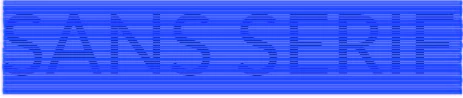
Here is what looked like once select everything

This is my result from pathfinder / subtract.

I've tried creating text as outlines which after reading found out will not work. As mentioned tried pen tool, thich and thin weight lines.This seems like simple task and for whatever reason I cannot get it to work no matter what. PLZ help feel foolish can't do simple pathfinder step lol

Thanks

    This topic has been closed for replies.
    Correct answer Ton Frederiks

    Alt (Option) click on the Minus front icon.

    5 replies

    Bill Silbert
    Community Expert
    Community Expert
    September 22, 2017

    Happy to help.

    Ton Frederiks
    Community Expert
    Community Expert
    September 22, 2017

    You don't need to create outlines for your text.

    Create your text.

    Create the stripes from rectangles on top of the text.

    Select all

    Alt-Click the Minus Front icon in the Pathfinder panel to creat a compound shape.

    Text and stripes will be editable.

    Booda2016
    Booda2016Author
    Participating Frequently
    September 22, 2017

    Ton,

    That's what I thought, I was doing exactly that (leaving text as is) and not converting to outlines.

    created text

    created bars

    pathfinder minus front (even changed layer order)

    result....

    Ton Frederiks
    Community Expert
    Ton FrederiksCommunity ExpertCorrect answer
    Community Expert
    September 22, 2017

    Alt (Option) click on the Minus front icon.

    Mike_Gondek10189183
    Community Expert
    Community Expert
    September 22, 2017

    You can still keep the type editable if you group the lines, than add the type to election & click make mask

    Then flip  checkmark settings until you get what you need

    There are a few hurdles you might encounter if you make  type outlines and pathfinder, which the explanation would get lengthy.

    Booda2016
    Booda2016Author
    Participating Frequently
    September 22, 2017

    Mike

    Definitely on right track. I thought this was simple as place txt, place bars, then minus front.


    However I did get to work with some letters chopped off.

    I'm going to reboot computer, Walk away and practice some more later. Lol. 

    Thank you, and everyone else for the help.  Try later tonight and start fresh :}

    Mike_Gondek10189183
    Community Expert
    Community Expert
    September 22, 2017

    For my part you are welcome, glad you got this working.

    Bill Silbert
    Community Expert
    Community Expert
    September 22, 2017

    If you want to do this using the Pathfinder it's a matter of using expanded lines and compound paths. See screen shot:

    In the first picture I made the text into outlines and also made it into a compound path (Command-8 on Mac Control-8 on PC). In the second picture I created and placed lines that I then expanded into paths (strokes will not work, they must be paths) and made all of those into a single compound path (they are colored red just to make it more clear) which I sent to the front. Then I selected all of this and used the Minus Front Pathfinder option (highlighted) and got the result shown.

    Booda2016
    Booda2016Author
    Participating Frequently
    September 22, 2017

    Bill,

    I had some success but as before whenever created outlines I'm getting same effect. Only the first letter. Maybe I'm missing step.

    Create text

    converted to outlines

    created line (stroke =2) solid fill / also tried outline

    object / expand (lines)

    placed over my text.

    WORKED - kind of.... only does one letter rest is missing. So strange

    Bill Silbert
    Community Expert
    Community Expert
    September 22, 2017

    The step you're missing is making the text a compound path.

    Jacob Bugge
    Community Expert
    Community Expert
    September 22, 2017

    Booda,

    What happens if you

    A) Create the live Type, then create the bars to knock out as black fill/nostroke rectangles (long enough), then select everything and in the Appearance palette flyout click Make Opacity Mask with both Clip and Invert Mask ticked?

    B) Create the live Type, then create outlines, then create the bars to knock out as rectangles (long enough), then select everything and Pathfinder>Minus front?