Participant
June 3, 2022
Answered

Pathfinder - Minus Front does not work as I want

  • June 3, 2022
  • 3 replies
  • 289 views

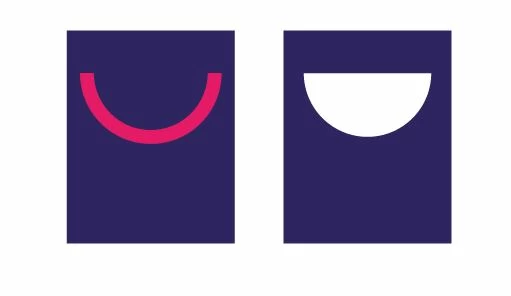
Hi, When I try to do "minus front" on the purple rectangle it becomes a solid half circle not just the "happy smile" as I want. Can anyone help me how to do this? I am stuck! 


This topic is closed to new replies. Start a new post to keep the conversation going.
Correct answer Maria24716256z8zv

Thanks, I just figured it out. I expanded the shape and then it worked! 

3 replies

Jacob Bugge
Community Expert
Community Expert
June 3, 2022

Maria,


If you (ever) wish to keep the stroke in order to enable later editing (which may be more relevant in other more complicated cases where you can also have a Group of paths), you can use an Opacity Mask based upon the original stroked path(s) as follows:


1) Change the Stroke colour to (full) black (and with multiple paths Group them if not already),

2) Select both path(s) and background and click Make (Opacity) Mask (in the Transparency panel).


Monika Gause
Community Expert
Community Expert
June 3, 2022

Is that red thing a shape or just a stroke? If it's a stroke: outline the stroke first.

Maria24716256z8zvAuthorCorrect answer
Participant
June 3, 2022

Thanks, I just figured it out. I expanded the shape and then it worked!
