christianee13896314
Participant
January 30, 2020
Question

Pattern

  • January 30, 2020
  • 4 replies
  • 1022 views

Hi,


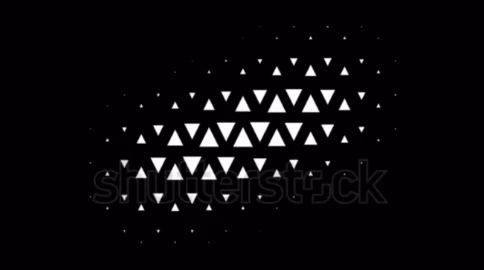
I need to create in Illustrator that kind of pattern effect: I can not find a solution to blend the pattern from the center to the sides. Does anybody has an idea ????


I need to
This topic has been closed for replies.

4 replies

Ton Frederiks
Community Expert
Community Expert
January 31, 2020

"Ray, you are providing an impressive example that demonstrates how powerful blends can be when using them with a creative strategy."

Absolutely, I was trying with Transform each a certain distance and scale, but I gave up whe I saw Ray's approach with symbols.

rcraighead
Legend
January 31, 2020

I realized my pattern did not faithfully match your sample. I missed a crossbar. Fortunately this was remedied by adding a line in each of the Dynamic Symbols. Here is the update: Blend_Symbols2.ai 

Kurt Gold
Community Expert
Community Expert
January 31, 2020

Ray, you are providing an impressive example that demonstrates how powerful blends can be when using them with a creative strategy.

rcraighead
Legend
February 1, 2020

Thanks guys. Illustrator is my "video game" 🙂

rcraighead
Legend
January 30, 2020

Here's a poor-man's solution blending two Dynamic Symbols, then using Envelope Distort:

Blend_Symbols.ai

christianee13896314
Participant
January 30, 2020

Cool - I will try this. Thanks. Do you even have a  solution for a freeform shape ? For example an oval as base shape and inside the pattern fades to all sides regular...


rcraighead
Legend
January 30, 2020

Not sure what you're after, but this was created by changing only the two Dynamic symbols the pattern is based on.
You could create your own variations.

Monika Gause
Community Expert
Community Expert
January 30, 2020

Maybe with the plugin Phantasm, would need a lot more fiddling:

Custom symbol

Setup on object