



Gareth_Williams
Inspiring
July 8, 2026
Question

Pattern Brushes On Line Unselectable?

  • July 8, 2026
  • 5 replies
  • 75 views

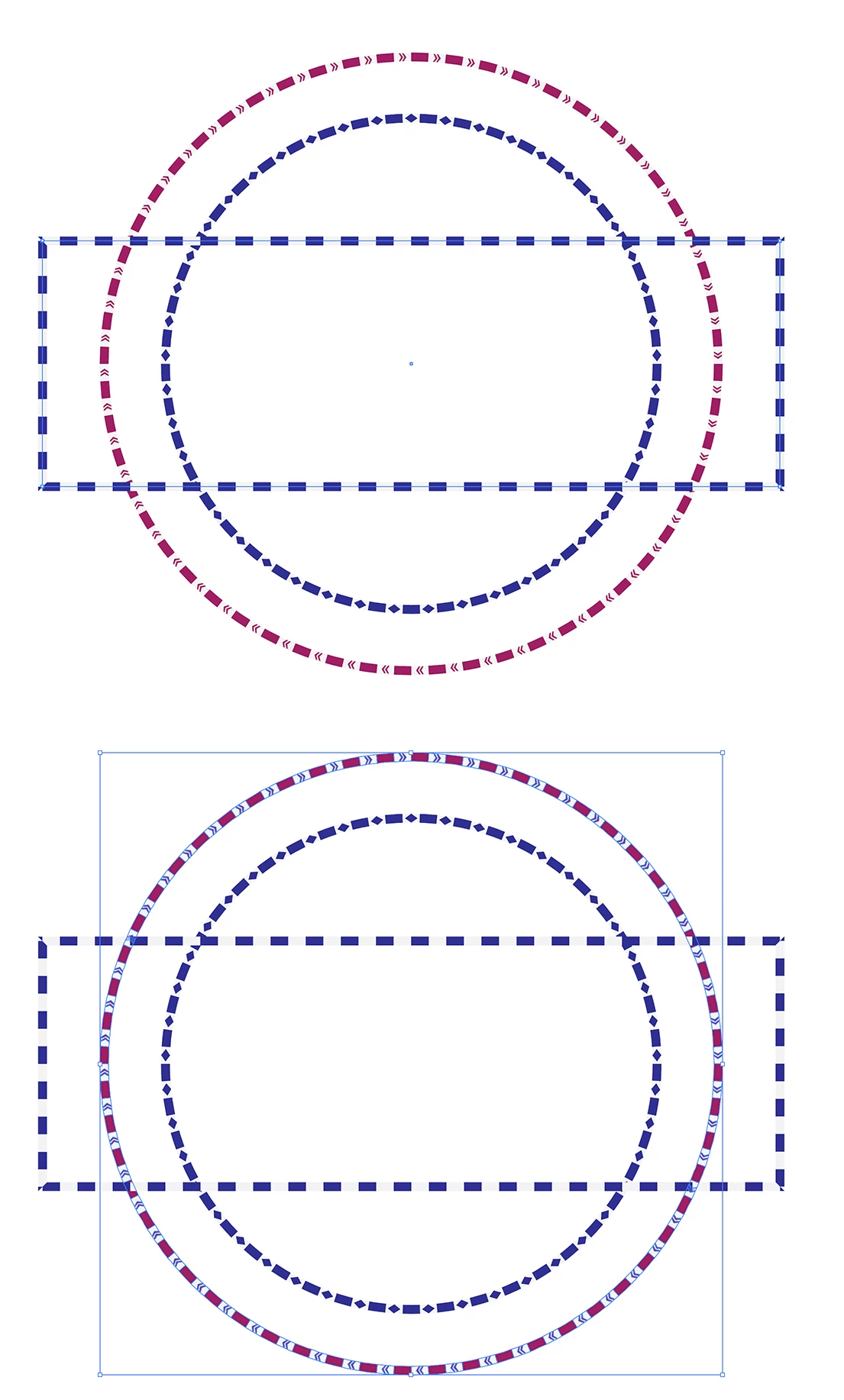
Hi everybody, I’ve got a file with lines with pattern brushes on like in this attachment. However, the file with these in has stopped allowing you to select the line. Therefor, you can’t select the line any more to turn the pattern brush off or to modify anchor points in the shape.

In image 1 the line is selected and can be modified but in image two the line in the shape is not selected or selectable. It has just selected all the shapes within the pattern brush. I can’t select the line in that shape any more! I could just make the line again when I want to edit it but that would be annoying and waste time.

Thanks for your help,
Gareth
 

    5 replies

    Gareth_Williams
    Inspiring
    July 12, 2026

    Thanks Monika/Ton, I think the issue is the user defined brushes to not stay in the brushes window after importing them. I will investigate this later. I am going on a short holiday tomorrow until Thursday. When I come back I will continue to investigate. Thanks again.

    Gareth_Williams
    Inspiring
    July 12, 2026

    The brushes automatically disappear from the brushes Window. That’s probably why the shapes expand. When I open the file next time, the user defined pattern brushes that I imported are gone from the brushes window. I have uploaded the file in which I made the pattern brushes. Can you get them from this file?

    Monika Gause
    Community Expert
    Community Expert
    July 12, 2026

    Thank you. I cannot reproduce the behaviour (except when I save as PDF without Illustrator editability of course). But saving on the harddisk, in the Cloud, even with “Save in background” turned on does not produce this issue.

    Probably you can try and reset the Illustrator preferences?

    Ton Frederiks
    Community Expert
    Community Expert
    July 11, 2026

    @Gareth_Williams Where do you save your files? On your hard disk? External disk, cloud folder? I tried a simple brush in 2025. The only time it would expand the brush is when you remove it from the Brushes panel. Since they are somehow not in the Brushes panel in your file, they get expanded.

    Do you see your custom brushes in: Users > your username > Library > Application Support > Adobe > Adobe Illustrator 29 > language folder > Brushes

    Gareth_Williams
    Inspiring
    July 12, 2026

    Yeah, thanks Ton, you’re right. My user defined brushes are vanishing from the brushes window in the file and every file. We’re looking into this now! Thanks again.

    Gareth_Williams
    Inspiring
    July 9, 2026

    Ok, so I think it expands automatically, so my solution is keeping a copy of the original shape on a different layer before adding the pattern brush. That way if I need to modify the shape I’ve still got the original with the editable anchor points.

    Monika Gause
    Community Expert
    Community Expert
    July 8, 2026

    The bottom one looks like the brush has been expanded. Can you tell us your steps?

    Gareth_Williams
    Inspiring
    July 8, 2026

    It shouldn’t have been expanded. I didn’t do anything to it. It happened by itself. I will investigate and see if I can work out what might have happened.

    Monika Gause
    Community Expert
    Community Expert
    July 8, 2026

    Can you please tell us the steps you have done?
