
Participant
June 17, 2023
Question

Pattern not centered to shape

  • June 17, 2023
  • 3 replies
  • 1384 views

I've been struggling with this for a while looking through tons of videos and such but nothing seems to talk about centering the pattern so it won't be cut off.


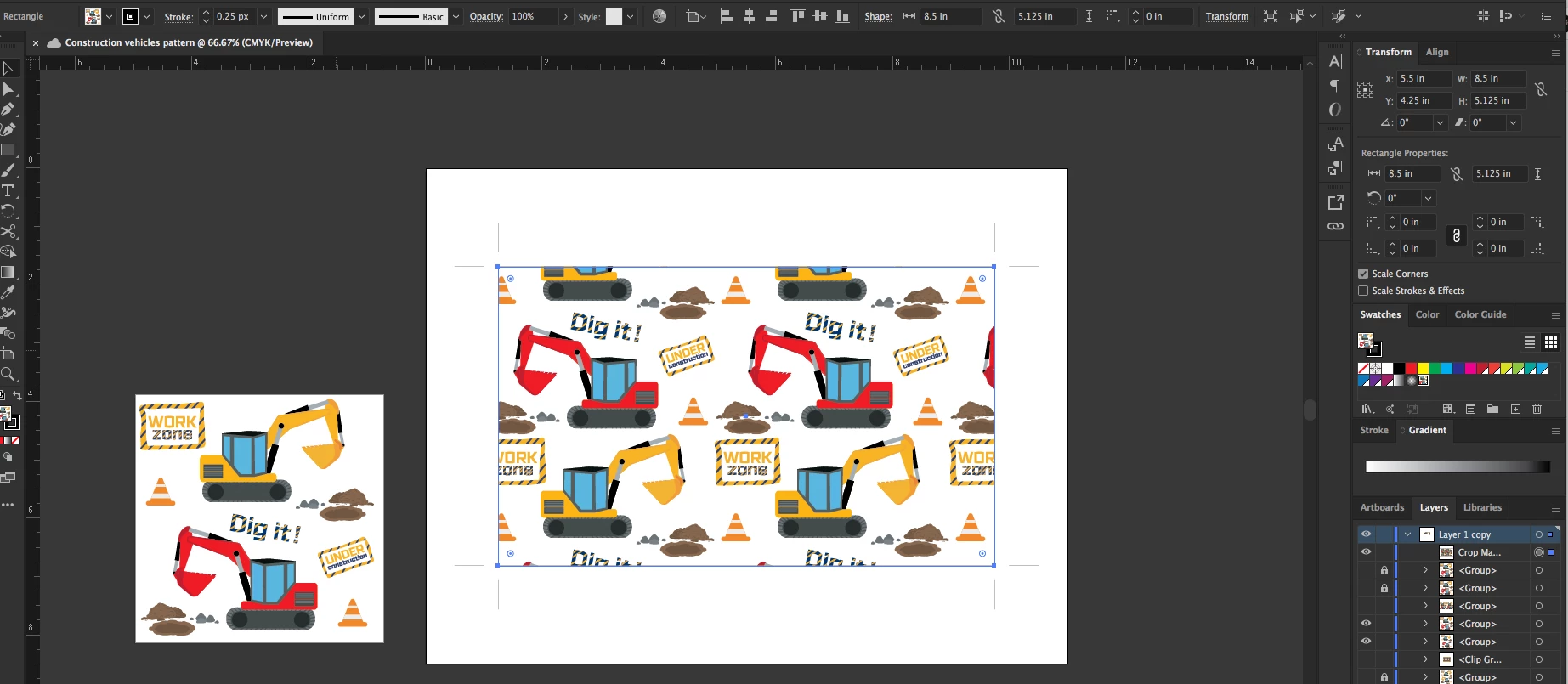
In the screenshot, to the left is my pattern Artboard is 4.25 Square I dragged this to my swatch panel already. For the larger artboard, I have a shape that is sized 8.5 x 5  I would like the pattern tool to center the pattern to my object.


Why does it not center it? I am creating designs for Tumblers and would like my patterns to be seamless. Need patterns to match or connect edge to edge.
 

This topic has been closed for replies.

3 replies

Monika Gause
Community Expert
Community Expert
June 17, 2023

To create a tiling artwork, you need to set up the artboard in a way that its dimensions are multiples of your original pattern swatch dimensions. So if your pattern swatch is 3x4 mm (or inches or football fields), then your artboard needs to be 6x8 or 12x8 or 9x12 mm (or inches or football fields)

loniroseAuthor
Participant
June 17, 2023

I did but still off-centered. I even played with the percentages to try and adjust the pattern within the shape but that didn't work.

Monika Gause
Community Expert
Community Expert
June 17, 2023

Do not "play with percentages". That won't help. Please upload your AI file to Dropbox or the like.

Ton Frederiks
Community Expert
Community Expert
June 17, 2023

I would not call it centered but maybe this is what you want;

Just make 2 copies of your pattern tile on the left and position them on the artboard.

Or create an 8,5 x 8,5 rectangle at the top left corner of your artboard (so that the upper left X/Y reads 0/0) and apply the pattern from the Swatches panel. You can move the rectangle to another position on the artboard, if the options (double click the black selection tool) are set to transform both objects and patterns.

loniroseAuthor
Participant
June 17, 2023

I did but I am just trying to get a better understanding so when I make more patterns for certain projects that require a seamless look, not cut off. It would kind of suck that I would have to do this manually instead.

Mylenium
Legend
June 17, 2023

Patterns use the actual size, not a fit-to-fill method. It seems you are misunderstanding the process. You may want to read the online help on how to generate tiling patterns using the pattern preview mode and all that good stuff.


Mylenium