
Participant
March 10, 2017
Answered

PDF Document to Blueprint Effect

  • March 10, 2017
  • 1 reply
  • 11915 views

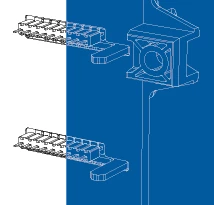
I have a PDF document that is a general arrangement drawing (the original CAD file isn't available so the manufacturer sent me a PDF file instead).  The background is white and the drawing itself are black lines.  Very normal of course.  Is there a way to use illustrator to manipulate the PDF document and and arrive at an image with a "blueprint" effect?  Basically, taking the white background...make it blue...and take the black lines comprising the drawing and make them white?

Tom
    Correct answer John Mensinger

    Hey Tom,

    Opening a PDF in Illustrator for editing, especially one that wasn't created in an Adobe app to begin with, isn't worth the risk in a case like this, so don't do that. Instead, Place the PDF (I'd use InDesign myself, but the same can be done in Illustrator), then draw a blue-filled rectangle over it and set the rectangle's Blend Mode to Screen.

    1 reply

    John Mensinger
    Community Expert
    John MensingerCommunity ExpertCorrect answer
    Community Expert
    March 10, 2017

    Hey Tom,

    Opening a PDF in Illustrator for editing, especially one that wasn't created in an Adobe app to begin with, isn't worth the risk in a case like this, so don't do that. Instead, Place the PDF (I'd use InDesign myself, but the same can be done in Illustrator), then draw a blue-filled rectangle over it and set the rectangle's Blend Mode to Screen.

    Participant
    March 10, 2017

    Thanks John.  Sorry for the very basic question here...I can seem to find the sequence to set the rectangle's blend mode to screen.  Can you offer up the sequence?

    Thanks for the help.

    Tom

    John Mensinger
    Community Expert
    Community Expert
    March 10, 2017

    No worries, Tom.

    It's in the Transparency panel (Window > Transparency). With the rectangle selected, choose Screen from the Blend Mode menu.