Participant
August 7, 2018
Answered

PEN TOOL / HERRAMIENTA PLUMA

  • August 7, 2018
  • 1 reply
  • 691 views

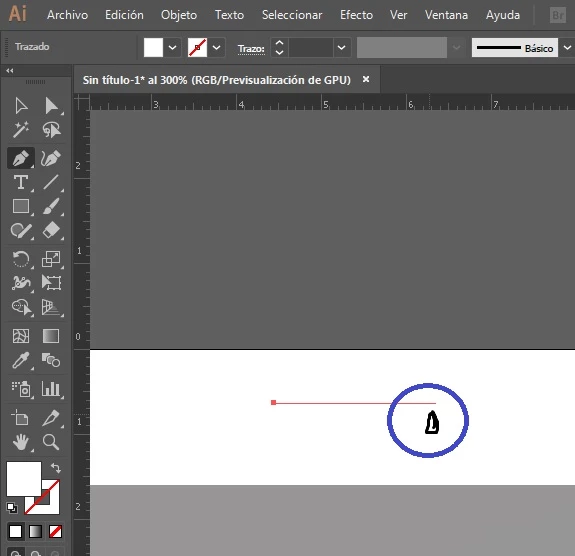
Hello great community! I do not know if any happened to him, if they look with the pen tool the path is not created exactly where I have the mouse pointer, (sorry but when I do screen capture does not come out the pointer, I had to make it haha) can someone help me? Regards!! USE CC2017

------------------------------------------

Hola gran comunidad!! no se si alguno le paso, si observan con la herramienta pluma el trazado no se crea exactamente donde tengo el puntero del mouse, (disculpen pero cuando hago captura de pantalla no sale el puntero, lo tuve que fabricar jaja) alguien me puede ayudar? Saludos!! USO CC2017
    This topic has been closed for replies.
    Correct answer Omar.Fathy

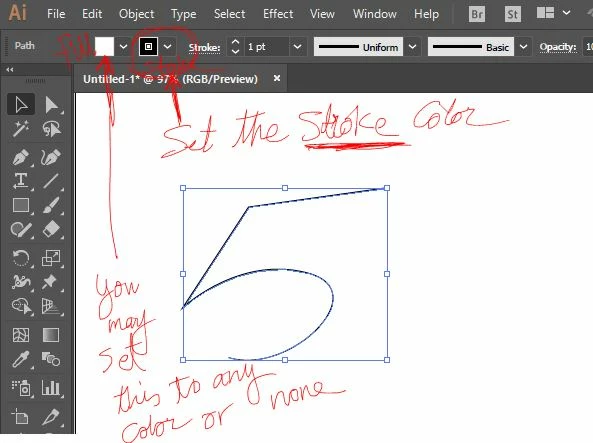
    If I understood what you say, The problem is you set the fill color to white and stroke color to None.
    So you should give the stroke any color ( but not white to be able to see it ) to appear after drawing it.

    1 reply

    Omar.Fathy
    Community Expert
    Omar.FathyCommunity ExpertCorrect answer
    Community Expert
    August 7, 2018

    If I understood what you say, The problem is you set the fill color to white and stroke color to None.
    So you should give the stroke any color ( but not white to be able to see it ) to appear after drawing it.

    Participant
    August 7, 2018

    oh man, how simple was. Thank you. God bless you