


Participant
Oct 19, 2024 1:09 AM UTC
Question

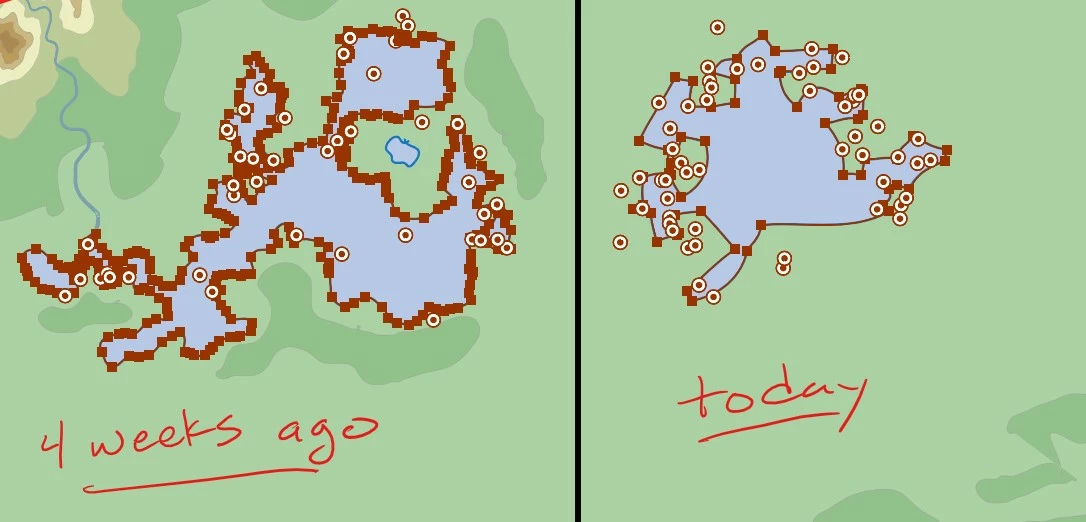
Pencil tool has become way too "smooth"...overnight

This is hard to explain but here it goes: I've been working on an illustration for about 4 months. My primary tool has been the pencil tool with the fidelity slider set all the way over to accurate. This allows me to get a lot of detail line work in there. I took a break from the piece for the past 3 weeks.

When I opened it up again today and started drawing, the detail and accuracy of my new lines is gone. The lines are smoothish and and way over simplified. I checked the fidelity slider and it's still all the way over to accurate and my other settings are the same as before. Any ideas or suggestions?
 

This topic is closed to new replies. Start a new post to keep the conversation going.

6 replies

jacobn23559132
Participant
Oct 23, 2024 7:50 PM UTC

Having the same issue. It's only laying down a few points per stroke.

Translate
Mike_Gondek10189183
Community Expert
Community Expert
Oct 19, 2024 4:26 AM UTC

Is align to pixel Grid on, turn it off.


Translate
Anubhav M
Community Manager
Community Manager
Oct 21, 2024 3:34 PM UTC

Hello @Erik36571118iz0l,

I am sorry to hear about your experience. We have already escalated this to the product team, and they are investigating this. I will update this thread as I have more information.

Feel free to reach out if you have more questions or need assistance. We'd be happy to help.


Anubhav

Translate
Participant
Oct 26, 2024 10:03 AM UTC

I'm having the same "too smooth" problem. Has there been any fix for this issue😢

Translate