
Participant
September 24, 2020
Answered

Pencil Tool Help

  • September 24, 2020
  • 2 replies
  • 500 views

I am trying to learn to sketch / trace using CS6 Adoe Suite's Illustrator. However I am running into an issue with the Pencil Tool.


Example:

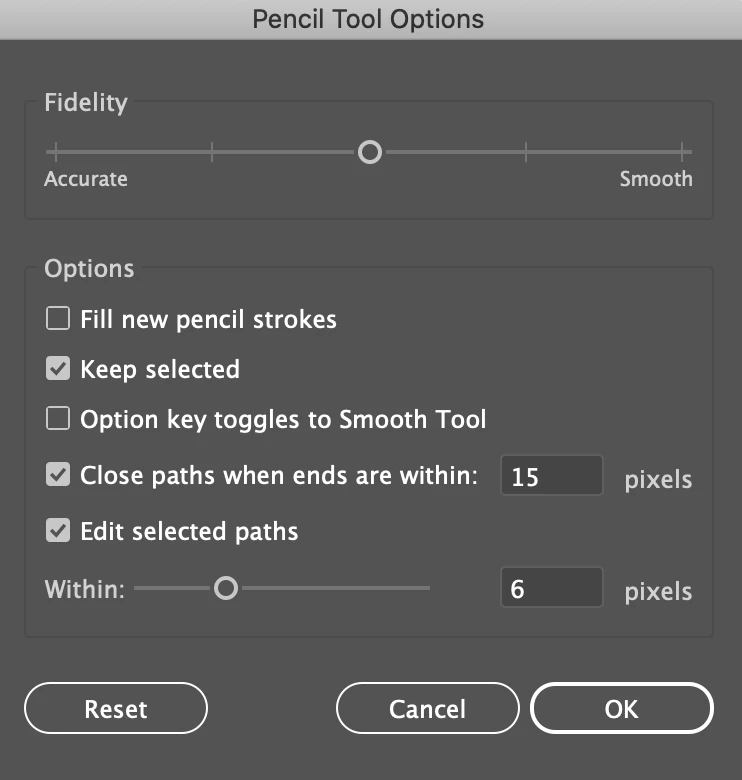
I trace an arm, then trace the body. The trace around the arm disappers. I attempt to retrace the arm, but then the trace on the body disappears. I move to the neck, make a trance, then trace the head - however they both combine and make a new object.


Does anyone know how I stop this from happening?
 

This topic has been closed for replies.
Correct answer Simmer1

Hi,


Double click on the Pencil Tool Icon and then play with your settings here to suit your work flow.


The pencil Tool works a little different fron the Pen Tool which may be your best bet for tracing.


The shortcut for the Pen Tool is P.

Thanks,

Sim

2 replies

Ashutosh_Mishra
Inspiring
September 24, 2020

Hi there,


Thanks for reaching out. In addition to what Sim has already mentioned, I'd request checking out this help article to know how to work with Pencil tool in Adobe Illustrator.

Hope it helps.


Regards,

Ashutosh

Simmer1
Community Expert
Simmer1Community ExpertCorrect answer
Community Expert
September 24, 2020

Hi,


Double click on the Pencil Tool Icon and then play with your settings here to suit your work flow.


The pencil Tool works a little different fron the Pen Tool which may be your best bet for tracing.


The shortcut for the Pen Tool is P.

Thanks,

Sim

RBCreatorAuthor
Participant
September 24, 2020

To what? It’s currently 12. Would 0 be best?--
"Every Designers' Dirty Little Secret Is That They Copy Other Designers'
Work. They See Work They Like, And They Imitate It. Rather Cheekily They
Call This Inspiration." - Aaron Russell


{Personal info removed by MOD}