


Inspiring
March 2, 2025
Question

Pencil tool in Ai - pixels problem (Unit of measurement in grid and pencil tool is different)

  • March 2, 2025
  • 1 reply
  • 285 views

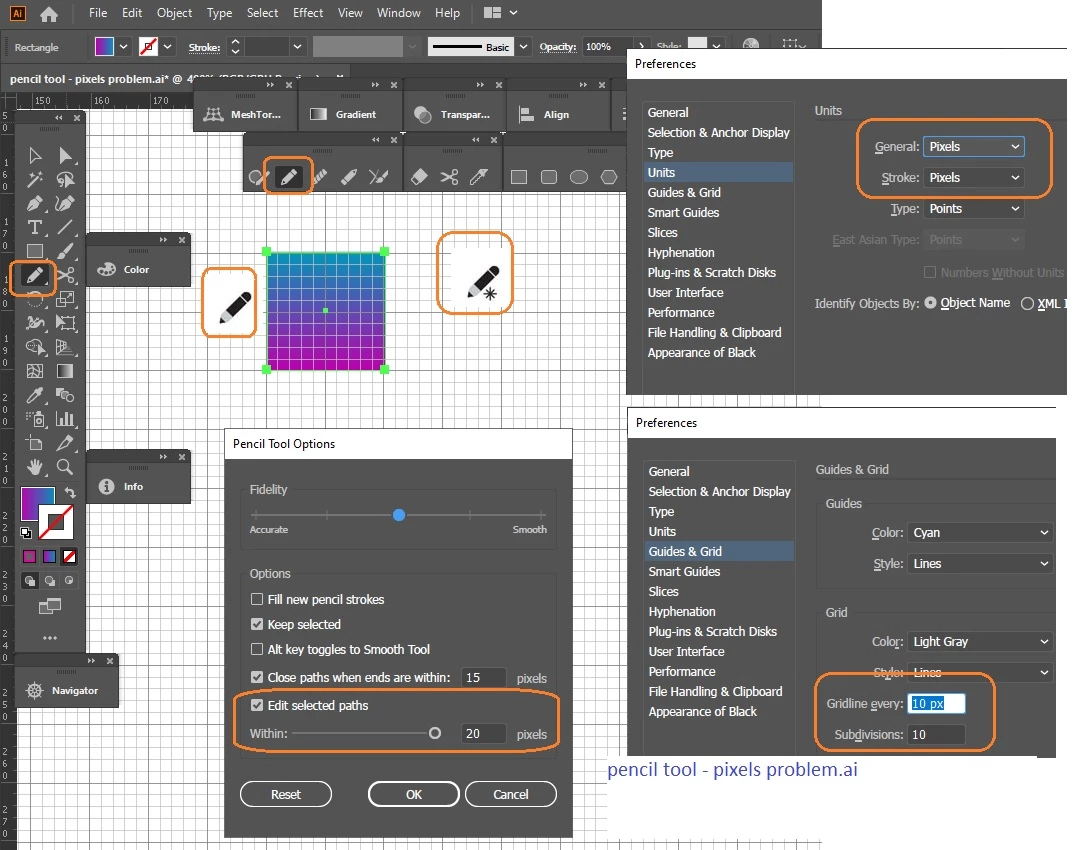
Pixels in the grid and pixels in the Pencil (Pencil tool) — different measurement results are obtained.
If in Illustrator you do Edit – Settings – Units: General – pixels, Stroke – pixels.
And also guides and grid: grid line every 10 pixels, divisions of 10. It turns out that each small square is one pixel.
In work Document setup - also pixels.

Draw a square 20 by 20 pixels, select it.

Then select the Pencil tool, in the Pencil tool options check ON a "Edit selected paths", specifying within 20 pixels.

Try to bring the Pencil tool at a distance of 20 pixels, or even 10 pixels - nothing will happen. But if it's very close to a square, then the Pencil tool will work (the asterisk disappears from the icons) and you can change the shape of the square. It feels like within 20 pixels these are some other pixels.

And if you set it within 5 pixels, then the Pencil tool will look even closer to a square.

Why doesn't the grid match? Or is there something in the options inside - do it mean other pixels?
1 reply

Anshul_Saini
Community Manager
Community Manager
March 18, 2025

Hi @Mr Kirotomo,


I understand how confusing and frustrating this issue must be, especially when you’re trying to achieve precise pixel alignment. Thank you for sharing the detailed steps — it really helps us understand the situation better.


Could you please confirm which version of Illustrator you’re currently using? Additionally, are you working at 100% zoom when observing this behavior? This can sometimes affect how pixels align visually and might explain the discrepancy you’re noticing.


Once we have these details, we can investigate further and provide you with the best possible solution. Looking forward to your response!


Best,

Anshul Saini

Inspiring
March 18, 2025

Good day, Anshul!

Thanx a lot for answer and discussion.

I am using Adobe Illustrator 24.0.1 (64-bit) from 2019.

OS Edition Windows 10 Pro
Version 22H2
Installed on 11-Aug-23
OS build 19045.5608
Experience Windows Feature Experience Pack 1000.19061.1000.0

About zoom: I try 100 and 400 and 800 zoom, same strange behavior.

I use Illy every day and like it, together we can solve this behavior.

Best regards!


Problem file was uploaded to this site

https://vk.com/wall-226891554_9

Anubhav M
Community Manager
Community Manager
March 28, 2025

Hello @Vladimir27313909vuem,

Thanks for confirming. While I check this with the team, could you update to the latest version of Illustrator (https://adobe.ly/4iEZCmG) to check if the problem persists?

Looking forward to hearing from you.
Anubhav