Victor,
How about this straightforward way?
a) The entire closed path is selected at level 1 (selection rectangle around the entire path)
b) Path clicked with direct selection tool
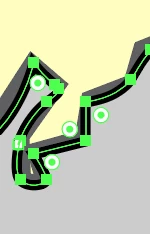
c) Manually mark the top area (anchor points) with the Direct Selection tool
d) With copy / paste ... Paste to original position Inserted to new layer
e/f) when clicking on the path on the new layer, the path consists of several individual pieces > just the one piece?
Once you have it safely pasted over, you can move the whole path round by ClickDragging by an Anchor Point or whatever with the (normal) Selection Tool, and move individual segments/Anchor Points (or sets) about with the Direct Selection Tool after deselcting the path (you can just click an empty spot).
You can also copy the path in front of itself and hide it, so it is still there (in place) to fall back on if something goes wrong in your further work.
And what Monika said about using the Insert Photos button; or helpers have to open each attachment separately, instead of just seeing the screenshots in your post (and clicking one or more if needing a closer look).

 AdChoices