
Participating Frequently
March 24, 2024
Answered

Phantom strokes on all objects. Why??

  • March 24, 2024
  • 2 replies
  • 1292 views

I feel like I'm losing it...I was working on a file tonight and setting up some guide layers and then I noticed that all of the objects in my file had thin cyan lines - text and shapes. These objects are on their own normal layer. There are no strokes applied to any shapes or text. I don't think I accidentally hit anything that would cause this, yet all new objects have these lines. They show up when I export as jpg or PDF.  Any ideas of what these are and how to remove them?


 I'm at a loss.
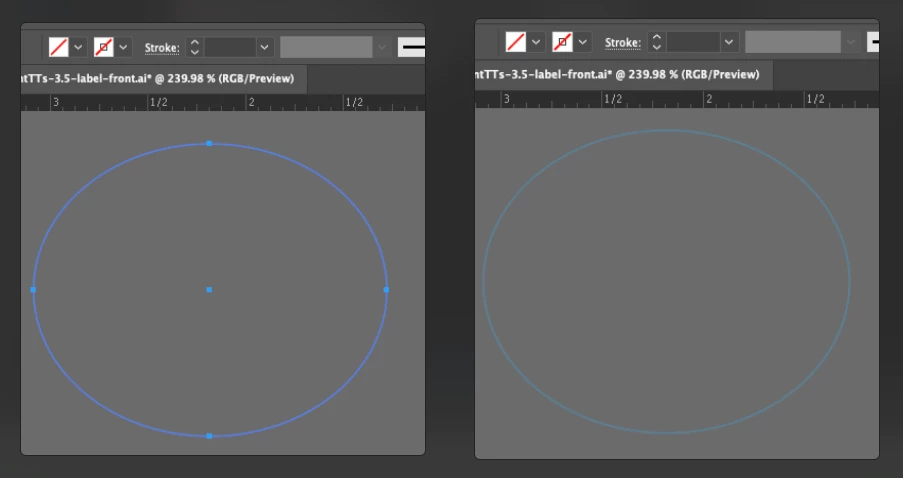
This topic has been closed for replies.
Correct answer Monika Gause

Strokes or fills applied to the layer and how to solve it:  https://youtu.be/YZooJyG2UT4 

2 replies

Participating Frequently
March 24, 2024

UPDATE: I ended up rebuilding the file and the new file did not have the mystery lines. I guess maybe the original file got corrupted? sigh. 

Community Expert
March 24, 2024

I took a look at the PDF you uploaded. When I selected the layer labled "Artwork" and checked it in the Appearance panel, there was a line stroke .0069" in width applied to the layer. Any new objects created in that layer or any other existing objects moved into that layer would inherit the blue line stroke assigned to that layer.

That .0069" line stroke value is kind of odd too. I've seen that as a default stroke in artwork from some older versions of CorelDRAW. The app would intend a .007" stroke, but it would come out as .0069".

tromboniator
Community Expert
Community Expert
March 24, 2024

.0069 in. expressed in points is .5, so there's nothing particularly odd about it as a stroke weight.


Peter

Kurt Gold
Community Expert
Community Expert
March 24, 2024

Can you share this Illustrator file for inspection?

Participating Frequently
March 24, 2024

Yup! Attaching a copy with placeholders.