
melaniei97525384
Participant
October 31, 2023
Question

Photoshop giving program error when opening .jpg or .png I've saved in Illustrator

  • October 31, 2023
  • 1 reply
  • 194 views

I tried flattening the artwork, flattening the transparency. Any other tricks? I've not run into this before, but I have a new PC, new installs, so quite possibily there is a setting somewhere that's different. (also the "learn how to fix" wasn't helpful)
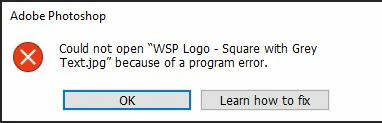


Thank you. 

This topic has been closed for replies.

1 reply

Monika Gause
Community Expert
Community Expert
October 31, 2023

There is no transparency in JPGs. 

Where do you save them?

Did you already rebbot the computer? Is there sufficient RAM?

melaniei97525384
Participant
November 1, 2023

I was just trying every trick in the help document.

So, I can't believe I forgot the old "reboot your computer and it will inexplicably magically fix everything" option. It is fixed. 

Thank you for the reminder. Photoshop will now open the jpg and png I created in Illustrator, because...reasons. 

Monika Gause
Community Expert
Community Expert
November 1, 2023

Glad you could solve it.