Known Participant
September 18, 2021
Question

Physical Representation of Colours in a Document (Color Bars)
  • September 18, 2021
  • 3 replies
  • 674 views


Hello,


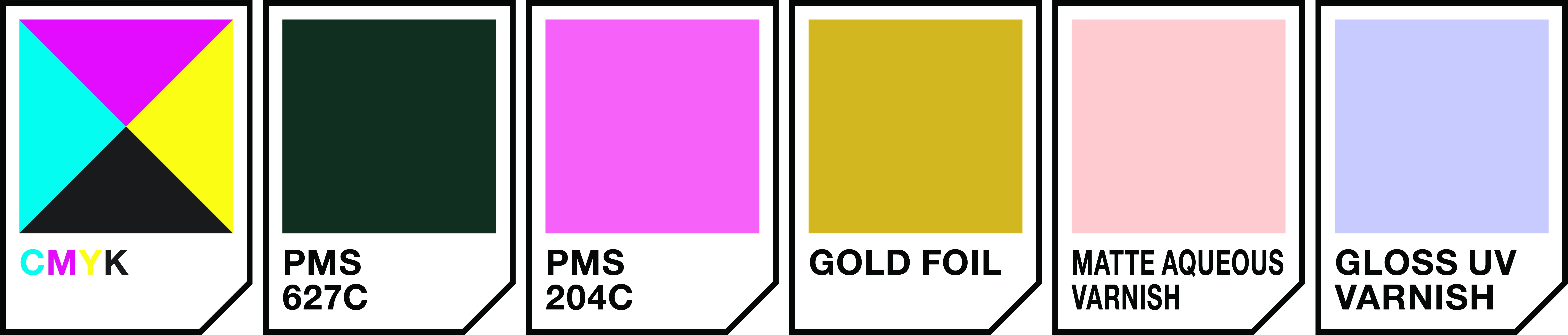
I work in a business where we create print cards for each job we produce. Sometimes we're requested to list all the colours, spot colours and varnish types used and they would like it presented like the attached image here.


I remember spending time at a business where the artist there had a script that would access all the colours in an Illustrator Layer called "Artwork" it would then spit out pretty much exactly what the attached image is - each colour in a square + text below it that says the name of the text. I believe it was either a text or an action, I'm not sure. Unfortunately that artist is no longer with us anymore.


From memory, whatever it was only listed the colours from a layer called "Artwork" there were other layers but it didn't list any of the colours in them.


I'd like to know what something like this would be? An action? A script? And is it possible to create?


Thanks

This topic has been closed for replies.

3 replies

Kurt Gold
Community Expert
Community Expert
September 20, 2021

Very good advice, Silly-V, for an Illustrator user who is claiming that he does not know how to code at all.


But I can see that you mean it well. 🙃


Kurt Gold
Community Expert
Community Expert
September 18, 2021

The script could certainly be modified, but perhaps it will work a bit better for you if you save a copy of the document, select all unused swatches with the corresponding command in the Swatches palette, delete them and then run the script.


Amaroo69Author
Known Participant
September 18, 2021

Cool. Yeah, I guess it could be altered. There is a line that reads...


doc = activeDocument,
swatches = doc.swatches,


I'm sure the doc.swatches is what's making it select all the swatches in the document and not just a layer.

Silly-V
Legend
September 18, 2021

It does all the swatches, so to target only ones used on art in certain layers will require going through layer.pathItems to get the fillColor(s). Example: doc.layers[0].pathItems[0].fillColor.

Since it looks like you are interested in the swatches which are spot colors, the 'fillColor' is going to actually be a SpotColor object which has a .spot property which has a .name property which tells you the swatch name:

var c = doc.pathItems[0].fillColor.spot.name;
 
This is one of those things which can be as simple as this, or much more complex: if you are only concerned with fill colors of flat line-art then the above code is ok - but if you have graphic styles, added raster effects colorized with swatch colors then you have to do something else.

To get a grasp of *any* swatch used will make the process take longer no matter how you wish to do it: you can create an entirely new document and remove all its swatches except for the required ones (they used to crash the app if you removed say [Registration]) then paste the art from your layer into it and take note of all new swatch names which appeared.

This can be achieved without the new document by creating an action that creates a color group from selected art and a comparison check can be used to cross-reference the names in this new group against all the existing swatches. Afterwards, delete the new created color group by running another action which deletes the selection inside the swatches panel. (Look up the app.doScript method for Illustrator to run a recorded action from a script)


Matters could be further complicated if someone uses a graphic style on a layer, and I have not tested whether the layer's colors would also be captured with the 'created swatch group from existing art' action. If not, probably doing the temp doc and copying the entire layer may work.


Kurt Gold
Community Expert
Community Expert
September 18, 2021

You may do a (Google) search for renderSwatchLegend.jsx


Also, there used to be a plugin called JLG Colors that does (did) what you are looking for, but I don't know if it is still available for recent versions of Illustrator.


Amaroo69Author
Known Participant
September 18, 2021

Thanks for the response. Both options look quite good but I'm not sure if it's what I'm looking for. I tried the renderSwatchLegend.jsx. It's pretty cool but it lists every single colour in the document, not just one layer and it also lists every single breakdown of CMYK in the document rather than one single swatch that says CMYK.