
Participant
June 9, 2022
Answered

Pin Text Wrap Options

  • June 9, 2022
  • 3 replies
  • 529 views

Is there a way to "pin" the text wrap options to either the control bar or the properties panel? It's extremely frustrating having to go through the Object menu when I'm wrapping multiple objects and needing to text different offset sizes. Any input is appreciated! Thank you!
This topic has been closed for replies.
Correct answer Anubhav M

Hello @GoldenGardens,


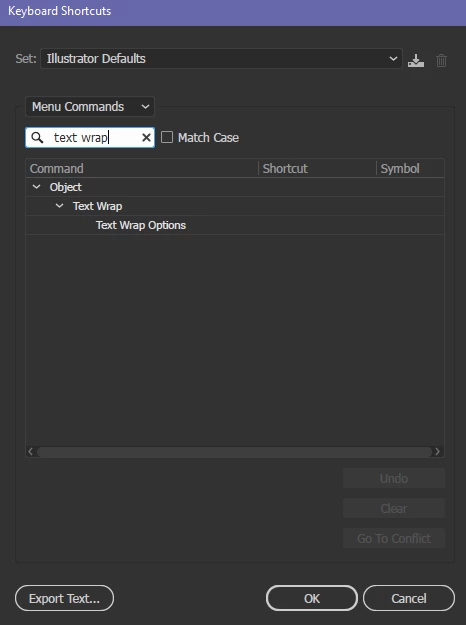
Thanks for reaching out. You can create a custom keyboard shortcut for Text Wrap Options, as suggested by Carlos.

Kindly try the steps shared in this help article (https://helpx.adobe.com/illustrator/using/customizing-keyboard-shortcuts.html) and check if it helps.


Looking forward to your response.


Thanks,

Anubhav


Note: Marking correct for visibility.

3 replies

Anubhav M
Community Manager
Anubhav MCommunity ManagerCorrect answer
Community Manager
June 9, 2022

Hello @GoldenGardens,


Thanks for reaching out. You can create a custom keyboard shortcut for Text Wrap Options, as suggested by Carlos.

Kindly try the steps shared in this help article (https://helpx.adobe.com/illustrator/using/customizing-keyboard-shortcuts.html) and check if it helps.


Looking forward to your response.


Thanks,

Anubhav


Note: Marking correct for visibility.

CarlosCanto
Community Expert
Community Expert
June 9, 2022

You can add your own shortcuts to Menu commands, press Alt+Ctrl+Shift+K to bring up the panel.


or you could press Alt, O, W, T (on Windows) to bring up the Text Wrap Options without assigning a shortcut key.

Mohammad.Harb
Community Expert
Community Expert
June 9, 2022

This feature is available in Adobe inDesign.