

Participant
Feb 11, 2024 11:19 PM UTC
Question

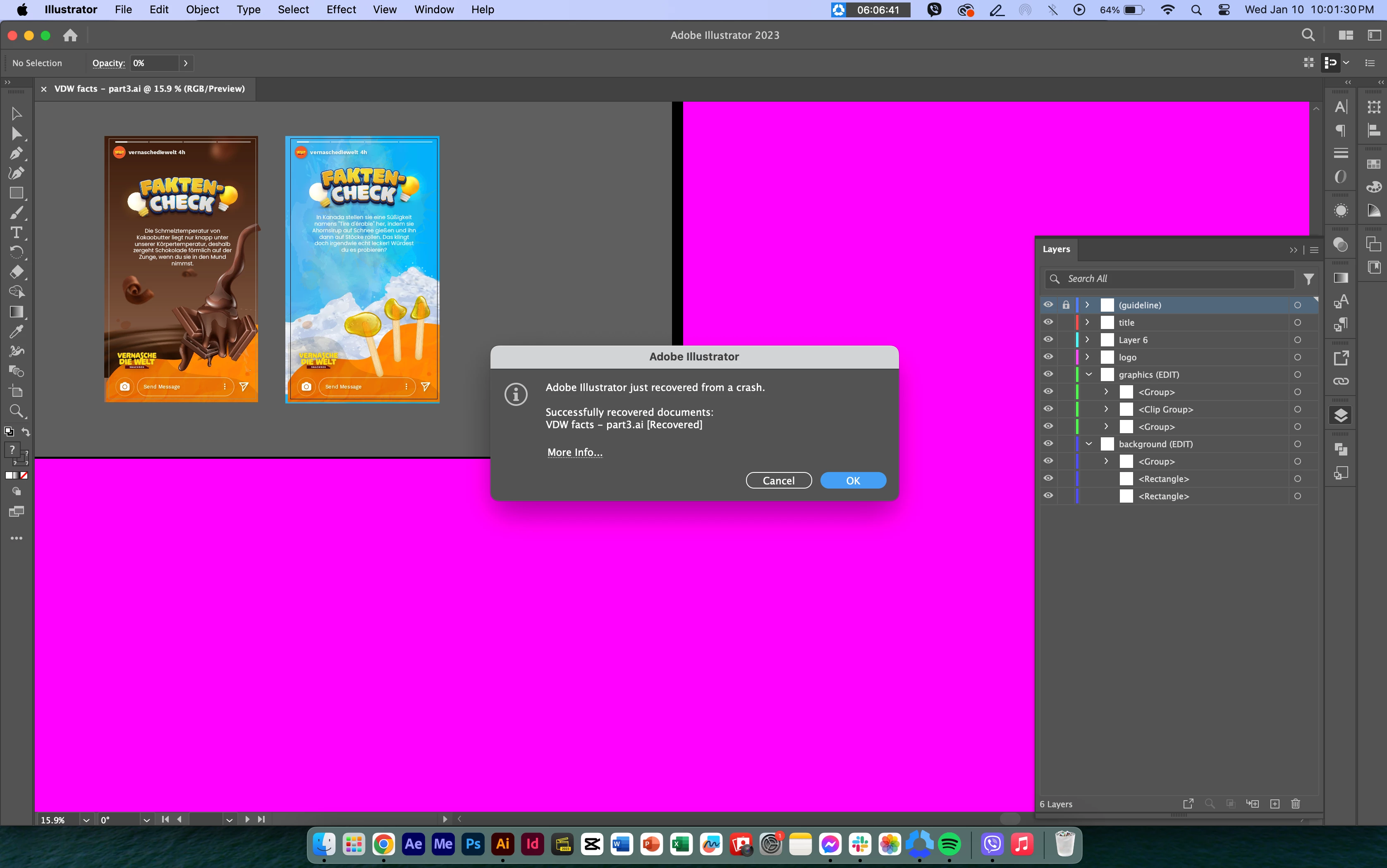
Pink Screen when loading/opening Adobe Illustrator on macOS

Hi! can someone help me fix this issue? I'm experiencening this glitch of pink screen whenever I open files in Adobe Illustrator. It it stays for like 1-2 sec the moment AI opens.

17 replies

Participant
Apr 29, 2026 11:53 PM UTC

Did anyone find a resolution to this problem?  I’m getting it a lot, the only way I can get rid of it is to close the file and reopen it. 

Translate
Anubhav M
Community Manager
Community Manager
May 1, 2026 11:41 AM UTC

Hello ​@blairmc 


I’m sorry to hear you’re experiencing similar issues with Illustrator. We’ll need some more information to be able to help you with this scenario:
 
1) AISniffer file
- Close all Adobe applications
- Navigate to the Illustrator Preferences folder and copy the AiSniffer file to the desktop from this location: Users/YOUR USERNAME/Library/Preferences/Adobe Illustrator #(version Number)Settings > AISniffer
 
2) System Report
- You can generate it from the Apple icon > About This Mac > System Report > Save to the desktop.
 

3) A brief screen recording of your exact workflow and the problem with replicable steps (if possible)

 
Kindly upload the files to Google Drive/Dropbox/etc. and share a public link here or via DM so that we can investigate this further.
 
Looking forward to hearing from you.
Anubhav

Translate
Participating Frequently
Nov 25, 2024 2:56 PM UTC

Did you manage to fix this issue? 

Translate
Participating Frequently
Jul 7, 2025 6:02 PM UTC

Hi all,

I am having the same issue - it came out of nowhere, and now it is painful to work in Adobe Illustrator. Has this been addressed? I don't have this issue in any other adobe application. 

Translate
Anubhav M
Community Manager
Community Manager
Jul 14, 2025 7:19 PM UTC

Hello @SKS Graphics,

I am sorry to hear about your experience. Could you confirm the version of the OS/Illustrator installed, and if this happens consistently across all files, or when using multiple monitors, so I can better assist you?

Also, try disabling GPU acceleration under Illustrator's preferences, and share your observations.

Looking forward to hearing from you.
Anubhav

Translate
Participating Frequently
Nov 24, 2024 9:21 PM UTC

Hi, did you manage to resolve the issue. I just encountered the exact issue and I can't seem to find a solistion to fix it. 

Translate
Anubhav M
Community Manager
Community Manager
Nov 25, 2024 2:08 PM UTC

Hello @courageous_Lily5EE9,

I'm sorry to hear about your experience. Would you mind sharing more details, like if this happens temporarily or if the pink screen stays like that on your canvas? Also, kindly confirm the OS/Illustrator version and if switching to CPU Preview and then back to GPU preview helps resolve the problem.

Looking forward to hearing from you.


Anubhav

Translate
Participating Frequently
Nov 25, 2024 10:20 PM UTC

The pink screen is temporary when opening the programme, it flickers for 1-2 seconds. Once my files is open it runs fine, but I'd rather get the pink screen issue sorted. Especially with my Mac being new (2 weeks old) 


specs:


MacBook Pro M4 

Mac OS : Sequoia 15.1.1


Adobe Ai Version 29.1 


I've tried switching between GPU and CPU performance, doesn't change the pink screen issue. 

screenshot attached below 

Translate
Participant
Sep 14, 2024 6:46 AM UTC

I am having the same problem... Have you had any luck finding out why? I will keep looking and let you know if I do.

Translate
Anubhav M
Community Manager
Community Manager
Sep 16, 2024 11:53 AM UTC

Hello @Studio Ngong,

I am sorry to hear about your experience. Would you mind sharing some more details, like the exact version of the OS/Illustrator, system config and Monitors, and a screen recording of the problem (https://adobe.ly/3B2omEG), so we can investigate this further?


Looking forward to hearing from you.


Thanks,

Anubhav

Translate
Anubhav M
Community Manager
Community Manager
Feb 15, 2024 12:58 PM UTC

Hello @shesheka,

We understand how frustrating it can be to experience crashes. Would you mind trying to update the OS(https://adobe.ly/3SHuQh7) and Illustrator(https://adobe.ly/3UO7ngS) to the latest version and checking if it helps? Also, try running Illustrator under a different administrator account (Windows / macOS) and sharing your observations.


Looking forward to hearing from you.


Thanks,

Anubhav

Translate