

MahaB82A
November 13, 2025
Answered

Pixels Issue

  • November 13, 2025
  • 3 replies
  • 252 views

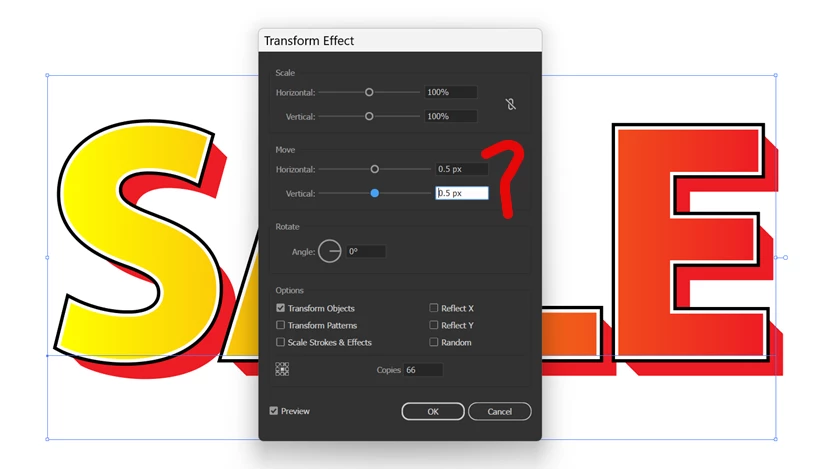
I assume PIXEL is number of squares [in this case]. Therefore pixels only take a whole number. In this case it take 0.5 as well.  How is it possible?
 

Correct answer Ton Frederiks

Illustrator is a vector application and Illustrator files do not have a resolution, although when it has to work with images and image effects it has to use a resolution for those.

Photoshop files are images and pixel based, they always have a resolution.

3 replies

MahaB82A
MahaB82AAuthor
November 20, 2025

Thanks for the explanation.

Ton Frederiks
Community Expert
Community Expert
November 20, 2025

Good to hear that helped.

Ton Frederiks
Community Expert
Community Expert
November 13, 2025

And because pixels do not have a fixed size (that depends on the resolution), Illustrator assumes that a pixel is the same size as a point; 1/72 of an inch.

MahaB82A
MahaB82AAuthor
November 13, 2025

What is the different between pixel in Photoshop and Illustrator?

Ton Frederiks
Community Expert
Ton FrederiksCommunity ExpertCorrect answer
Community Expert
November 13, 2025

Illustrator is a vector application and Illustrator files do not have a resolution, although when it has to work with images and image effects it has to use a resolution for those.

Photoshop files are images and pixel based, they always have a resolution.

Ton Frederiks
Community Expert
Community Expert
November 13, 2025

Illustrator is a vector editor, vectors are scalable to any size. Converting to pixels will always round them when exporting as an image. But when working in Illustrator you want precision and not limit yourself to rounded values.

