

Known Participant
June 13, 2025
Answered

Place text exactly straight on circle

  • June 13, 2025
  • 2 replies
  • 243 views

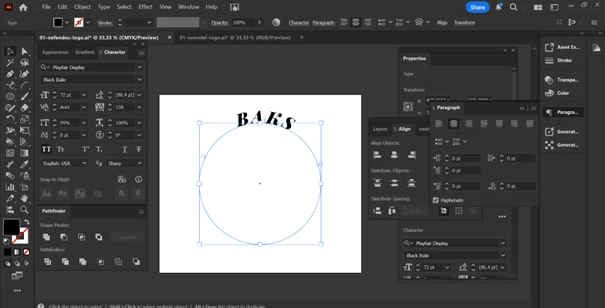
Hi, i want to make a logo with text above and under but want the text exactly straight to each other.

Can anyone help me out?
Correct answer Jacob Bugge

Stefanie,


You can Adjust Alignment to Center, as shown here,

https://helpx.adobe.com/illustrator/using/creating-type-path.html


or adjust the Baseline to have both sets of letters (appear visually) centred on the circle.


And/or based on another interpretation, is Paragraph set to Align center for both sets, and are you centring them on the top and bottom Anchor Points?


The screenshot is very little.


2 replies

Known Participant
June 16, 2025

Thankyou for your reply, i have used Paragraph and Align to Centre and now i have done this:


First I write text on path:

Then I move the text around path till they meet each other above:

Then I add BAKS on the path and turn the circle till BAKS is above the circle:


stefaniedesigns
Jacob Bugge
Community Expert
Jacob BuggeCommunity ExpertCorrect answer
Community Expert
June 13, 2025

Stefanie,


You can Adjust Alignment to Center, as shown here,

https://helpx.adobe.com/illustrator/using/creating-type-path.html


or adjust the Baseline to have both sets of letters (appear visually) centred on the circle.


And/or based on another interpretation, is Paragraph set to Align center for both sets, and are you centring them on the top and bottom Anchor Points?


The screenshot is very little.

