Participant
May 8, 2021
Question

Placed PDF in Illustrator has gaps in lines where they intersect with rectangles

  • May 8, 2021
  • 2 replies
  • 781 views

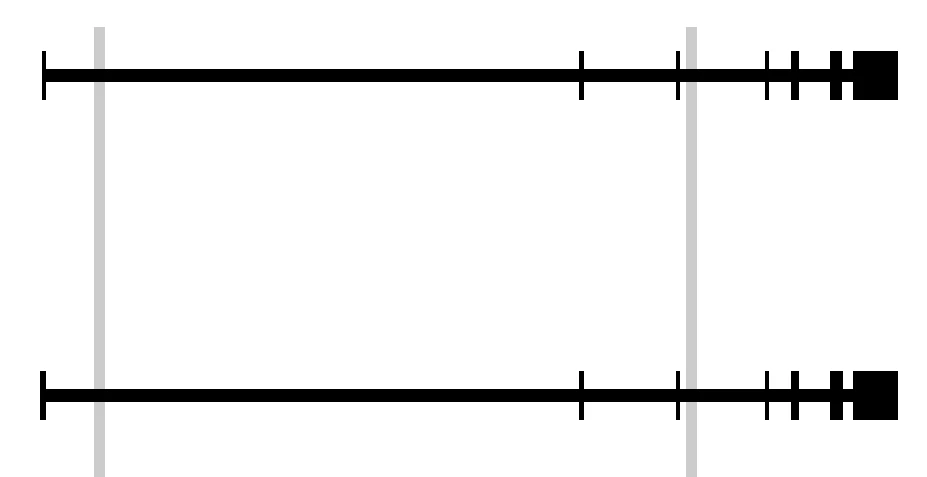
I have a diagram that I made in a PDF file, which I'm trying to place using Illustrator to make a multi-pane figure for a scientific publication. However, some of the lines that are drawn in the original PDF file have breaks in them once I've placed them using Illustrator.


Here's a zoomed view part of the PDF before placing:
 And here it is after being placed:
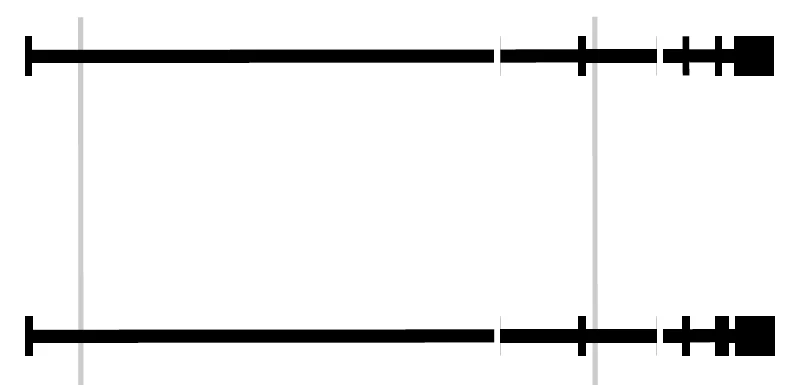
 How can I avoid this problem?

This topic has been closed for replies.

2 replies

Luke Jennings3
Community Expert
Community Expert
May 10, 2021

Another option is to place the PDFs into InDesign.

Bill Silbert
Community Expert
Community Expert
May 8, 2021

Instead of using the Place command (as it sounds like you're doing) what happens if you use File>Open to open the PDF file directly into Illustrator? Since part of the native format of Illustrator is PDF you should be able to just open it in this manner and have it retain its vector qualities.

Participant
May 9, 2021

If I open the PDF directly, it does indeed preserve the original image. However, I still need to add the other panes of the figure (which are each their own PDF file). Is there a way to place and arrange multiple PDFs through File>Open instead of File>Place?

Monika Gause
Community Expert
Community Expert
May 9, 2021

Open all the files and copy/paste their content into a new file.


PDF was never even meant for editing and Illustrator is not a general purpose PDF editor. So if it works: be happy. If it doesn't: there's probably not a lot you can do about it other than fix the artwork..