Participant
March 15, 2022
Answered

PlacedItem matrix TX & TY nowhere near actual position

  • March 15, 2022
  • 2 replies
  • 547 views

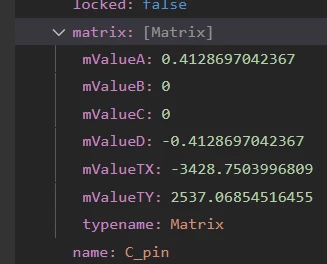
I'm writing a tool to export PlacedItems' pos/rot/scale out to a JSON file, then reading them into a proprietary app. I get the transform matrix, no problem. However, the matrix values don't make sense.

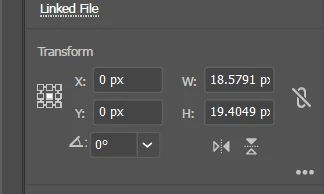
In the poperties panel, the linked object's transform is [0, 0].

In the object's matrix, [mValueTX, mValueTY] are [-3314, -2537].

How do I reconcile these numbers?
 

This topic has been closed for replies.
Correct answer Ian23598363t8yj

Lumenn, worked great!
The documents have multiple Artboards, so I ended up using the conversion script.

sourceDoc.artboards.setActiveArtboardIndex(index);
var pos = sourceDoc.convertCoordinate(
	item.position, 
	CoordinateSystem.DOCUMENTCOORDINATESYSTEM,
	CoordinateSystem.ARTBOARDCOORDINATESYSTEM);

2 replies

m1b
Community Expert
Community Expert
March 15, 2022

I think @Lumenn's answer is right. You might prefer to use the artboard coordinate system though if you only have one artboard, but otherwise the document coordinate system is the more robust.

- Mark

m0riya
Participating Frequently
May 31, 2022

Hi, I have the matrix of TextFrame. I tried to get the normal TX & TY but it didnt work.
Do you have any  idea why or how should I do it?


The Text:


The Matrix:

The Geometric Bounds:

[  60.701171875,   
-47.81591796875,
501.041015625,
-224.4404296875  ]


 The Code:

var  matrix = selection[0].matrix, 
        pos= [ matrix.mValueTX, matrix.mValueTY];
app.activeDocument.convertCoordinate(pos ,CoordinateSystem.DOCUMENTCOORDINATESYSTEM ,CoordinateSystem.ARTBOARDCOORDINATESYSTEM)

 The Result:


m1b
Community Expert
Community Expert
May 31, 2022

Hi @m0riya, good question and we didn't answer the OP's question. I had a poke around and I couldn't find any property or method of anything that shows or provides a relationship between the matrix T values and the document or artboard coordinate spaces. If I translate the text frame by inverted T values (so they are both zero) it puts the item down *near* the bottom right corner of my artboard (but not exactly in the corner!). Sorry I couldn't find an answer.


However, as this thread explores, perhaps there are other ways?

- Mark


Edit: ignore my previous post requesting a new question—you are perfectly correct to ask in this thread.

Lumenn
Inspiring
March 15, 2022

Hello, 

I'm not sure if this will be the case, but try tinkering with Application.CoordinateSystem (CoordinateSystem)
There are two of them - Artboard and Document.
You could also use Document.convertCoordinate function, to recalculate the position, if you don't want to change it in whole Application for some reason.


While running Artboard coordinate system, then placement is calculated relative to artboard starting point, for Document - placement is calculated globally.


I don't remember which one was the default, but i know when i was working on some position translating scripts it saved me a lot of time.

Ian23598363t8yjAuthorCorrect answer
Participant
March 18, 2022

Lumenn, worked great!
The documents have multiple Artboards, so I ended up using the conversion script.

sourceDoc.artboards.setActiveArtboardIndex(index);
var pos = sourceDoc.convertCoordinate(
	item.position, 
	CoordinateSystem.DOCUMENTCOORDINATESYSTEM,
	CoordinateSystem.ARTBOARDCOORDINATESYSTEM);