Known Participant
May 1, 2017
Question

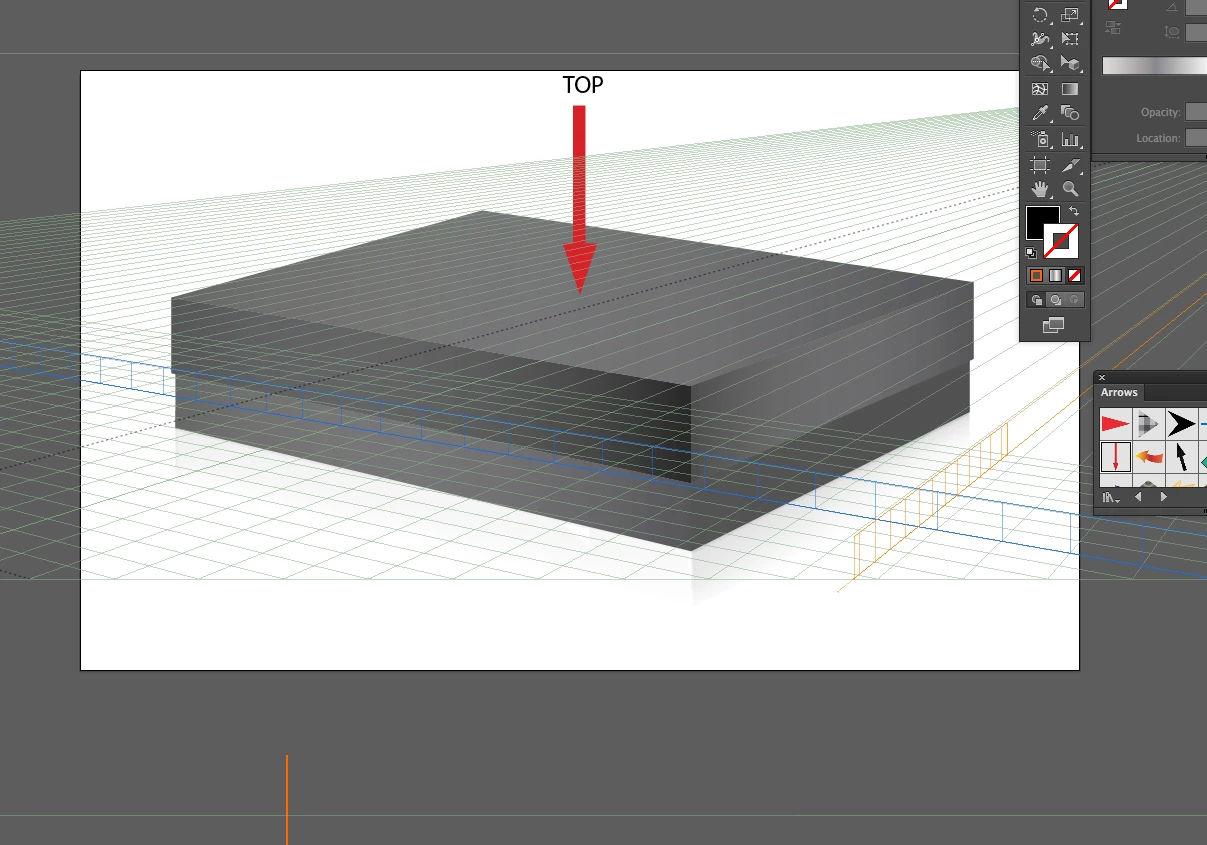
Placing an object on perspective grid top

  • May 1, 2017
  • 2 replies
  • 1648 views

Hi,

I would like to place an object on the top of the box in the attached image, yet the perspective grid doesn't seem to give that option. Is there a way? Thanks!

    This topic has been closed for replies.

    2 replies

    Ray Yorkshire
    Participating Frequently
    May 1, 2017

    Double click on the Perspective Grid Tool icon in the tools panel

    and make sure Show Active  Plane Widget is selected,

    then  click on the little widget itself to select a plane.

    The widget might be hiding behind some other panel...  


    Monika Gause
    Community Expert
    Community Expert
    May 1, 2017

    That box has not been built in the perspective grid of this file.

    Known Participant
    May 1, 2017

    Correct, but can't you adjust the grid to fit something existing?

    Monika Gause
    Community Expert
    Community Expert
    May 1, 2017

    Sure you can.

    So what exactly is your problem?