



AllmondPrinting
Participating Frequently
November 24, 2025
Question

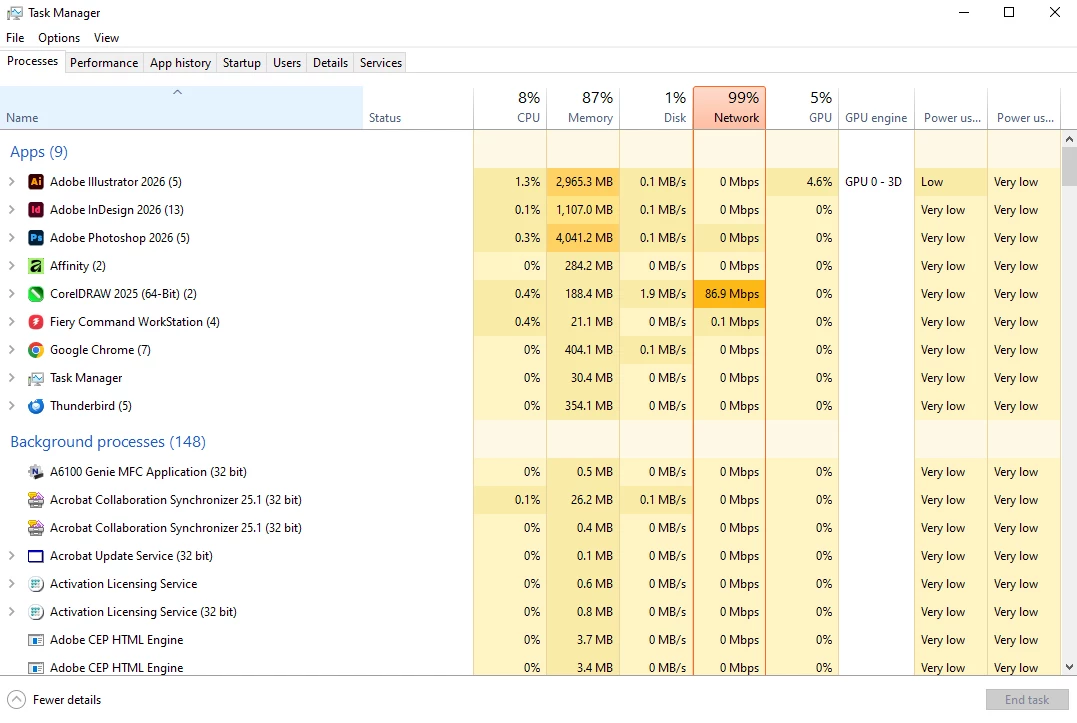
PLEASE, Fix this massive memory leak in your software!
  • November 24, 2025
  • 1 reply
  • 189 views

There are NO files open in ANY program on my computer, and Illustrator, InDesign, and Photoshop are hogging ALL of my RAM. Since the last update, my computer has been glitchy, so I had a little check this morning and see THIS. We pay entirely too much for this subscription to have it bring our computers to a halt this way. 

1 reply

creative explorer
Community Expert
Community Expert
November 25, 2025

@AllmondPrinting I had preferences issues on my MAC and when I went to Apple, they suggested in removing my Adobe preferences. I was leery, so I made a copy of them. Actually, I selected all the stuff in the preferences and deleted them. Once I restarted the computer it created new prefrences...and guess what, the Adobe apps worked great! 

Quit all the Adobe Apps. 

  • PC: Navigate to the following path: C:\Users\[Username]\AppData\Roaming\Adobe\[App Name] . To reset preferences, you usually delete or rename the entire app-specific settings folder.
  • MAC: Navigate to the following path: Preferences/Adobe: /Users/[Username]/Library/Preferences/[App Specific Folder]

When you restart your computer after deleting the folders, it will automatically create a new, clean set of preferences and configuration files.

m
AllmondPrinting
Participating Frequently
November 25, 2025

I'll try this, then.