Participant
May 25, 2022
Answered

PLEASE HELP

  • May 25, 2022
  • 2 replies
  • 528 views

 DON'T KNOW WHAT HAPPEN WITH MY FILE , WHILE IM WROK IS NORMALLY , BUT WHEN ALREADY SAVE AS AI FILE AND WHEN OPEN AGAIN THE COLOUR OF SOME OBJECT HAS CHANGE LIKE AVATAR -*-

This topic has been closed for replies.
Correct answer Anshul_Saini

Hi @Gavyn242645244fjk,


We are sorry for the trouble. We are able to reproduce the issue at our end. We have already logged a bug with the product team, and they are currently investigating the issue.

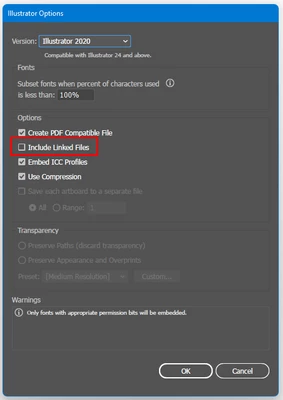
This is happening with the Ai file, which has linked images. While saving, when the "Include linked files " option is selected and then reopened, the Ai file images get inverted, or yellow color can be seen.


To avoid this, you may try the following steps:

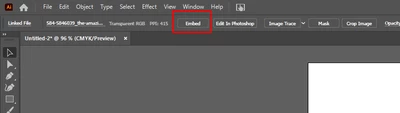
  • Embed the images in the document
  • Uncheck the "Include linked files"
  • Downgrade to an older version of Illustrator 


Let us know if this works for you or not.


Thanks & Regards,

Anshul Saini

2 replies

Anshul_Saini
Community Manager
Anshul_SainiCommunity ManagerCorrect answer
Community Manager
June 2, 2022

Hi @Gavyn242645244fjk,


We are sorry for the trouble. We are able to reproduce the issue at our end. We have already logged a bug with the product team, and they are currently investigating the issue.

This is happening with the Ai file, which has linked images. While saving, when the "Include linked files " option is selected and then reopened, the Ai file images get inverted, or yellow color can be seen.


To avoid this, you may try the following steps:

  • Embed the images in the document
  • Uncheck the "Include linked files"
  • Downgrade to an older version of Illustrator 


Let us know if this works for you or not.


Thanks & Regards,

Anshul Saini

Smizzlez23
Inspiring
May 25, 2022

Pretty cool art man. I don't have an answer for you tho.