
Please Help! "Create Outlines" problem with font when printed.
Hello,
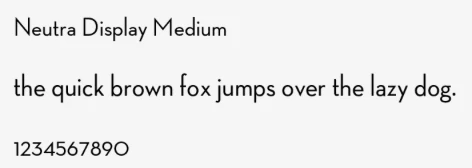
Please, I need your help. I created a business card in Illustrator using the "Neutra Display" font. What is curious about this font is that when you type "numbers" the numbers appear smaller and are automatically lowered on the line even though it is the same font size. For the business card, the client did not like this look and they want the numbers to appear that same size and thickness as the rest of the font letters.
In order to achieve this I had to use a smaller font size for the numbers and then create a "stroke" around the numbers in order to get the numbers to appear as the same thickness and size as the rest of the letters. On my computer screen it looked good but when I sent the pdf file off to moo.com to print, the results were not good. The numbers actually appeared skinnier than the rest of the font. Before I saved the AI file as pdf I used the "Create Outlines" function for the whole document. It looks to me as if the printer at moo did not recognize the "stroke" I added and only printed the outlines, (the stroke goes beyond the outlines). How can I fix this issue so that the numbers and the rest of the font appear the same? The numbers which appeared thinner when printed are, 7, 33, & 10016 in the address.
Thank you.

[Moved from the non-technical LOUNGE Forum to the Program forum... Mod]
[Here is the list of all Adobe forums... https://forums.adobe.com/welcome]
 AdChoices