
aaronk66952522
Participant
July 17, 2017
Answered

Please Help: only Typekit fonts display in Control and Character panels

  • July 17, 2017
  • 2 replies
  • 304 views

I have installed typekit and it's great but now I can't search my system fonts in the character palette or in the top menu. The only way to see my system fonts is to go to type menu form the top drop down which is a tedious and painstaking way to search fonts.  it has limited the range of the search to typeset only. Please help me

[Title edited for clarity by moderator]

.
This topic has been closed for replies.
Correct answer Pariah Burke

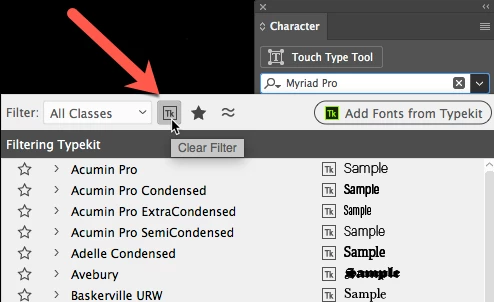
Also make sure you don't have the TypeKit filter activated. In my screenshot below you can see that I do have it activated in the Font Family list on my Character panel. That means the list will only display TypeKit fonts without any of the fonts directly installed on my system. Just click that button again to deactivate the filter and see all fonts on your system, including locally installed and TypeKit fonts.

2 replies

Pariah Burke
Community Expert
Pariah BurkeCommunity ExpertCorrect answer
Community Expert
July 17, 2017

Also make sure you don't have the TypeKit filter activated. In my screenshot below you can see that I do have it activated in the Font Family list on my Character panel. That means the list will only display TypeKit fonts without any of the fonts directly installed on my system. Just click that button again to deactivate the filter and see all fonts on your system, including locally installed and TypeKit fonts.

Mike_Gondek10189183
Community Expert
Community Expert
July 17, 2017

Try clicking this magnifying glass. I seem to remember an option saying typeset only. Might only show if you have some typeset fonts loaded.