



PNG Color Shift When Embedding in Illustrator – Adobe RGB Profiles Now Causing Issues
Issue Summary:
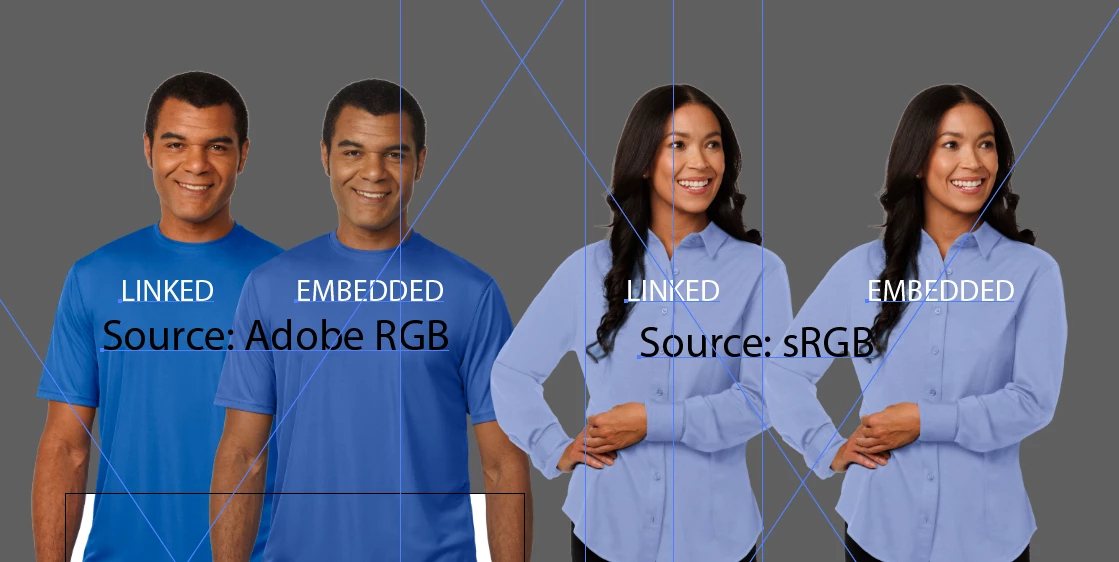
We're experiencing a severe color shift issue when embedding transparent PNGs with Adobe RGB color profiles in Illustrator. This began recently and did not occur in previous versions. The same images look correct in Photoshop and when linked in Illustrator, but shift colors significantly when embedded — especially affecting skin tones and blues/purples.
Key Details:
Our team uses thousands of transparent PNGs daily across our product catalog.
We've experienced historical color issues with untagged PNGs, which we resolved last year by saving all assets via Photoshop's "Export As" to retain an embedded RGB profile (either sRGB or Adobe RGB).
Until recently, both sRGB and Adobe RGB PNGs embedded without issue.
Current Problem (as of Sept 2025):
PNGs with Adobe RGB profiles now shift color when embedded in Illustrator.
PNGs with sRGB profiles do not shift when embedded.
Strangely, previously-problematic untagged PNGs (no profile) now embed without color shifting.
The color shift does not occur when images are linked — only when embedded.
Tested Versions:
Illustrator 29.8.1 (Issue present)
Illustrator 29.9.0 (9/12 update — Issue still present)
Illustrator 29.7.1 (Issue still present)
Downgrading to 29.5.1 resolves the issue — both Adobe RGB and sRGB PNGs embed without color shift.
Troubleshooting Steps Taken:
Verified in multiple Illustrator versions
Reset and adjusted color settings
Confirmed consistent color profiles in Photoshop source files
Reproduced issue across multiple machines
Impact:
This bug is disrupting production and affecting the visual quality of thousands of assets.
Our team’s standard workflow is to embed, not link, PNGs.
We cannot afford to manually re-save or strip profiles across our entire image library as a workaround.
Request:
Please escalate this issue to the Illustrator engineering team. This regression is breaking functionality that previously worked reliably. Illustrator needs to properly honor Adobe RGB color profiles when embedding PNGs — just as it has in the past.
Thank you.
 AdChoices