Inspiring
July 22, 2019
Question

PointText/AreaText conversion bug/feature?

  • July 22, 2019
  • 1 reply
  • 436 views

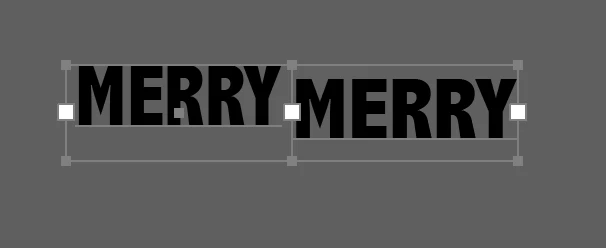
We are having an issue with the behavior of converting PointText to AreaText. In the image below, the left hand side is an AreaText that was created specifically as an area text, but the right hand side is a PointText that was converted to AreaText.

What we're trying to do is to recreate the text boxes using only the information about text box sizes and various character attributes. The two look clearly different, but nothing in the values of the various TextFrameItem fields (or the corresponding CharacterAttribute fields) seems different. Consequently, we are unable to create a text box that looks like the right hand image through a script. In other words, is there any thing in the TextFrameItem object that I can use to distinguish between these two cases?
This topic has been closed for replies.

1 reply

CarlosCanto
Community Expert
Community Expert
July 22, 2019

are you trying to match the text frame or the text itself?

I don't see a difference between area text I typed and type text I converted to area text. I moved one a bit to the right to illustrate the 2 of them

Inspiring
July 22, 2019

We're trying to match the TextFrame and character attributes. The actual text content might change. The problem that we're having is that when we create the TextFrame and add text to it with the character attributes, the resulting text is rendered slightly above (like on the left hand side of my original image).

BTW, I'm doing this in CC2019 (23.0). Here are my steps to recreate:

1. Create a point text Abadi MT Condensed Extra Bold. 24pt, center justified. Type in MERRY. Double click the little dot on the right side of the text to convert it to an AreaText. Note the w/h of this text box in the info panel. (in my case, it was about 61 x 26)

2. Draw an AreaText box with approximately those dimensions (I got to 62 x 26). Set the same font, font size and center justified. Type in the text MERRY.

3. Align the centers of both text boxes to produce the image below.

I don't know if the behavior varies with font, but I have tried at least 15 other fonts and I see the same thing, although the difference between the baselines differs based on the font. My suspicion is that AreaText boxes treat the first line differently to align the top of the text to the top of the text box, but point text does not do that and treats all lines the same way, and when the point text is converted to area text, it retains that behavior. The question is whether or not there is a way to either find that out, or manipulate it from Javascript.

Here's an image of the equivalent of yours, but this is a direct overlay without any offset.

Inspiring
July 22, 2019

BTW, I also just verified that the paragraph attributes between the two text ranges is also identical.