Answered
Pointy corners on triangle
Hi
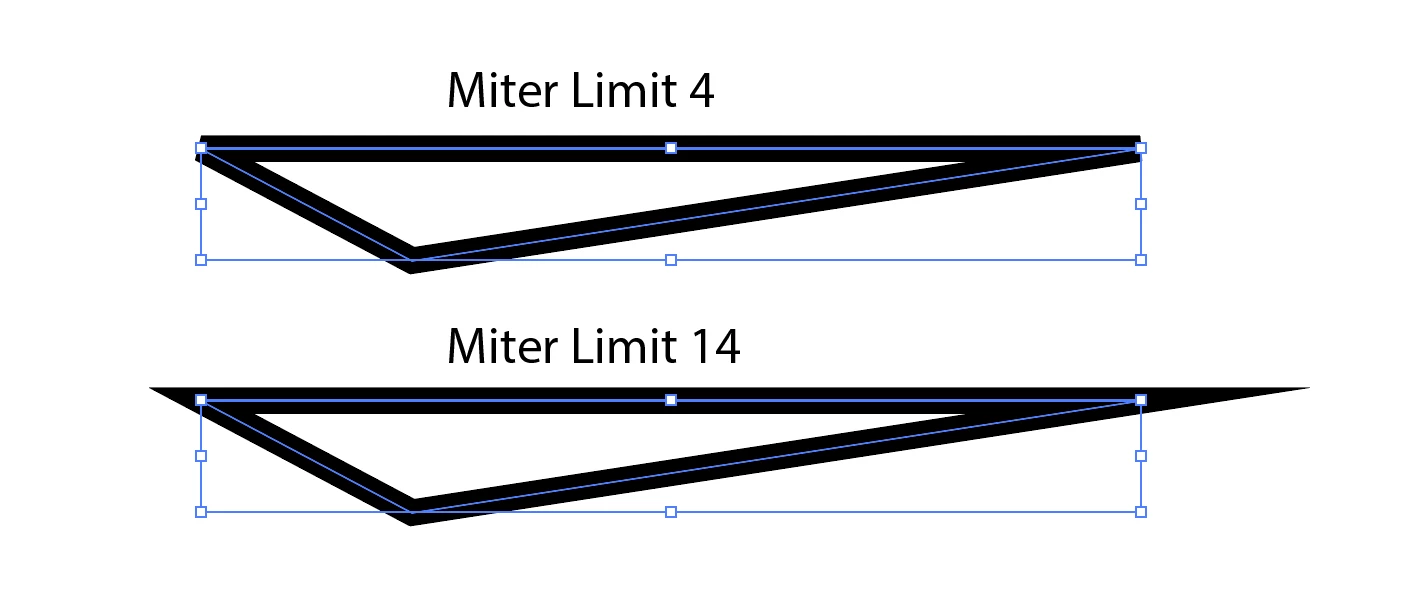
Why do I sometimes get pointy corners (left), and hard corners (right)? And how do I control it?

Thanks

Hi
Why do I sometimes get pointy corners (left), and hard corners (right)? And how do I control it?
Thanks
Miter Join Creates stroked lines with pointed corners. Enter a miter limit between 1 and 500. The miter limit controls when the program switches from a mitered (pointed) join to a beveled (squared-off) join. The default miter limit is 10, which means that when the length of the point reaches ten times the stroke weight, the program switches from a miter join to a bevel join. A miter limit of 1 results in a bevel join.
Already have an account? Login
Enter your E-mail address. We'll send you an e-mail with instructions to reset your password.
 AdChoices