
Participant
January 16, 2017
Answered

Position and size information does not work with the perspective grid

  • January 16, 2017
  • 2 replies
  • 405 views

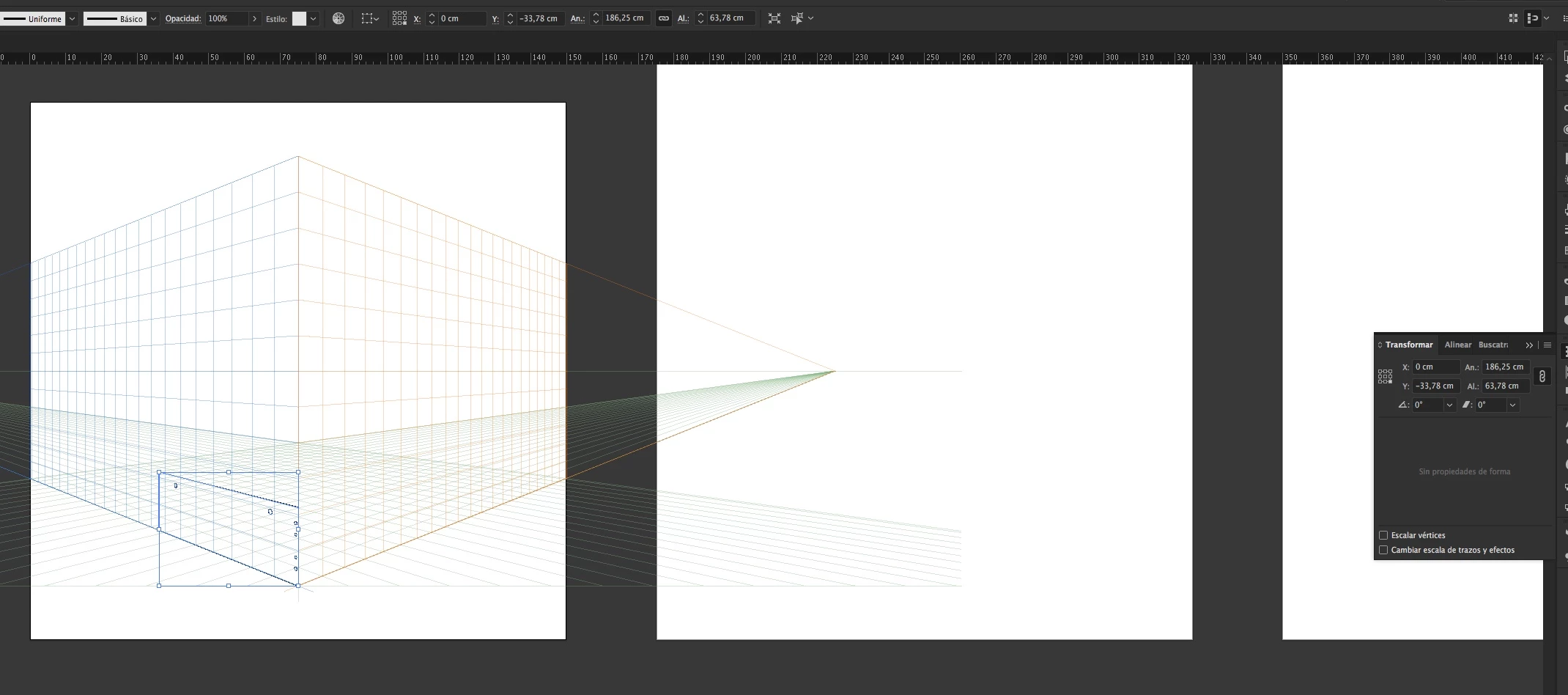
The position and size information does not work with the perspective grid, driving erroneous data and does not let you adjust to a certain point or give a given size to an object.

In the image you can check that the box is in position X: 0 / Y: 0 and the information marks something else. In addition both the height and width does not show correct size.

In previous versions this did not happen.

Does anyone know the reason and solution?
    This topic has been closed for replies.
    Correct answer Miguel_0

    The error persists for all files created with versions prior to the Illustrator update of 1/16/2017.

    It is only corrected if we create a new document.

    2 replies

    Miguel_0AuthorCorrect answer
    Participant
    January 17, 2017

    The error persists for all files created with versions prior to the Illustrator update of 1/16/2017.

    It is only corrected if we create a new document.

    Kurt Gold
    Community Expert
    Community Expert
    January 16, 2017

    What happens if you temporarily hide the perspective grid?

    I don't think that this is a new behaviour. The zero point has always changed when showing the perspective grid (to its central vertical line).

    Miguel_0Author
    Participant
    January 16, 2017

    Not only is the position, if you want to size the item, the controls do not work correctly.

    Monika Gause
    Community Expert
    Community Expert
    January 16, 2017

    If you want to scale it, use the perspective selection tool