December 10, 2025
Answered

PPD for mac on illustrator 2025

  • December 10, 2025
  • 2 replies
  • 1214 views

Hello everyone! I really need help saving some pdf, I need to export just some spot colors but I have a mac and the PPD I used to work with for 2023 and 2024 version doesn't work on 2025. How can I make the poscript without the ppd or where can I find the ppd? Thank you

Correct answer Ton Frederiks

Hi Tom! Thanks for the answer. This is what I needed the final pdf to look like:

Captura de pantalla 2025-12-10 a la(s) 17.11.02.png

That was exported in the print window, by my friend who uses Windows.

As I show in one of the screenshots, the option for preserve colors, so I can separate them in acrobat, doesn't appear when I export:

Captura de pantalla 2025-12-10 a la(s) 17.15.06.png

On the other hand, I already have the PPD file in my Illustrator folder, I even used it last year in Indesign, but apparently (this is what ChatGPT told me anyways) Adobe stop using PPD with Mac or something like that, but there is not other option besides those two.


As described above, you can use the Print dialog to select a PPD when choosing other.
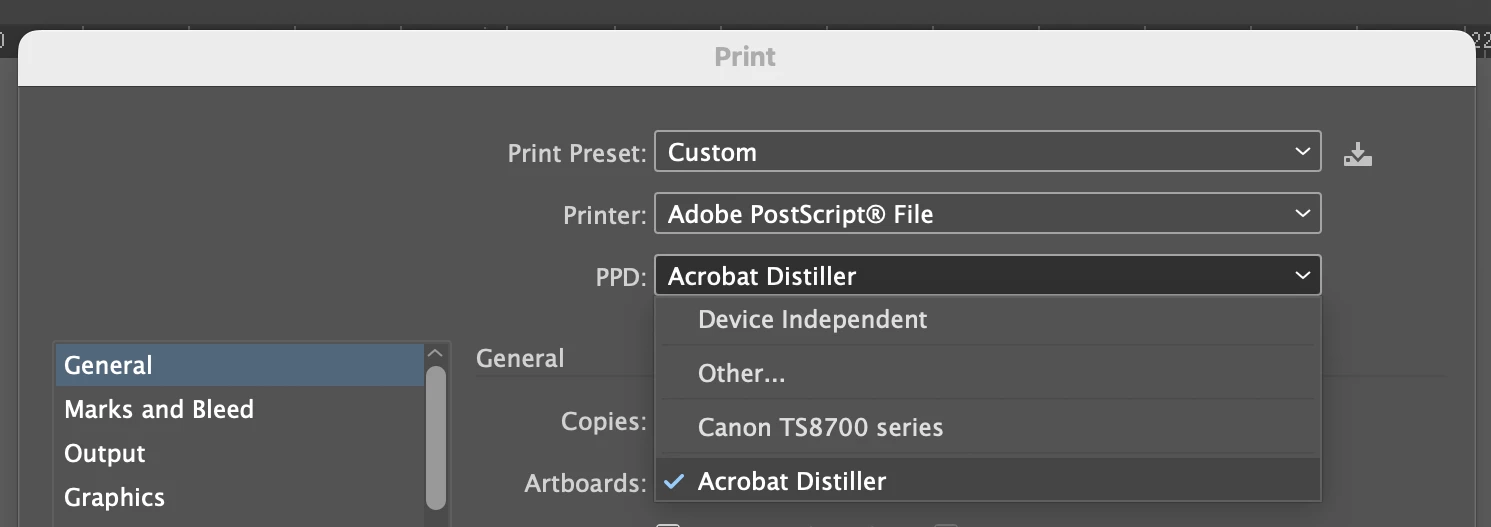
868937i67DF3F8E1D8F584E.png


2 replies

Ton Frederiks
Community Expert
Community Expert
December 10, 2025

You can create separations by printing to a PostScript file and use the Distiller PPD

In the Illustrator Print dialog choose: Printer > Adobe PostScript File.

For PPD select: Other and choose the Distiller PPD: ADPDF9.PPD

Then you are able to select: Mode > Separations (Host Based) in the Output tab.

You can save the PostScript file and use the Acrobat Distiller to create the separated PDF.

But...

It will be a grayscale document that does not contain halftone dots, your printer needs to support printing halftone dots if you want to print anything else than flat solid colors.

The direct download for the PPD:

https://helpx.adobe.com/content/dam/kb/en/852/cpsid_85257/attachments/ADPDF9.zip


December 10, 2025

Hi! I’m having an issue working with spot colors in Adobe Illustrator in MacOs. 


I’m preparing a file for printing using spot colors and I need to keep them as separate plates. However, the options “Preserve Spot Colors” and “Separation Preview” do not appear so I can’t click them.


This happens even though:

• My swatches are set as Spot Color (not Process).

• The artwork is using only those spot colors.


I also cannot generate a PostScript (.ps) file because Illustrator shows no PPDs available.

When I open the Print dialog and choose “PostScript File” as the printer, the dropdown for selecting a PPD is empty.

Without a PPD, Illustrator will not let me create the PostScript file I need in order to impose the document into printer spreads.


Because of these issues, I’m unable to:

– preview spot color separations,

– export a PDF that preserves spot inks,

– or generate a PostScript file for imposition.


Could you please help me understand why Illustrator is not recognizing any PPDs and how I can restore the ability to generate PostScript files and preserve spot colors?

Ton Frederiks
Community Expert
Community Expert
December 10, 2025

To save a PDF that preserves spots you don't need a PPD or a PostScript file, just save asPDF and use the Press Quality preset.

December 10, 2025

Hi Tom! Thanks for the answer. This is what I needed the final pdf to look like:

868928i70E6D59EBF451C32.png

That was exported in the print window, by my friend who uses Windows.

As I show in one of the screenshots, the option for preserve colors, so I can separate them in acrobat, doesn't appear when I export:

868930i894780501A106C98.png

On the other hand, I already have the PPD file in my Illustrator folder, I even used it last year in Indesign, but apparently (this is what ChatGPT told me anyways) Adobe stop using PPD with Mac or something like that, but there is not other option besides those two.



