
caelumxi
Participant
October 19, 2021
Question

Preferences window too big on Macbook

  • October 19, 2021
  • 2 replies
  • 1005 views

Hello community,


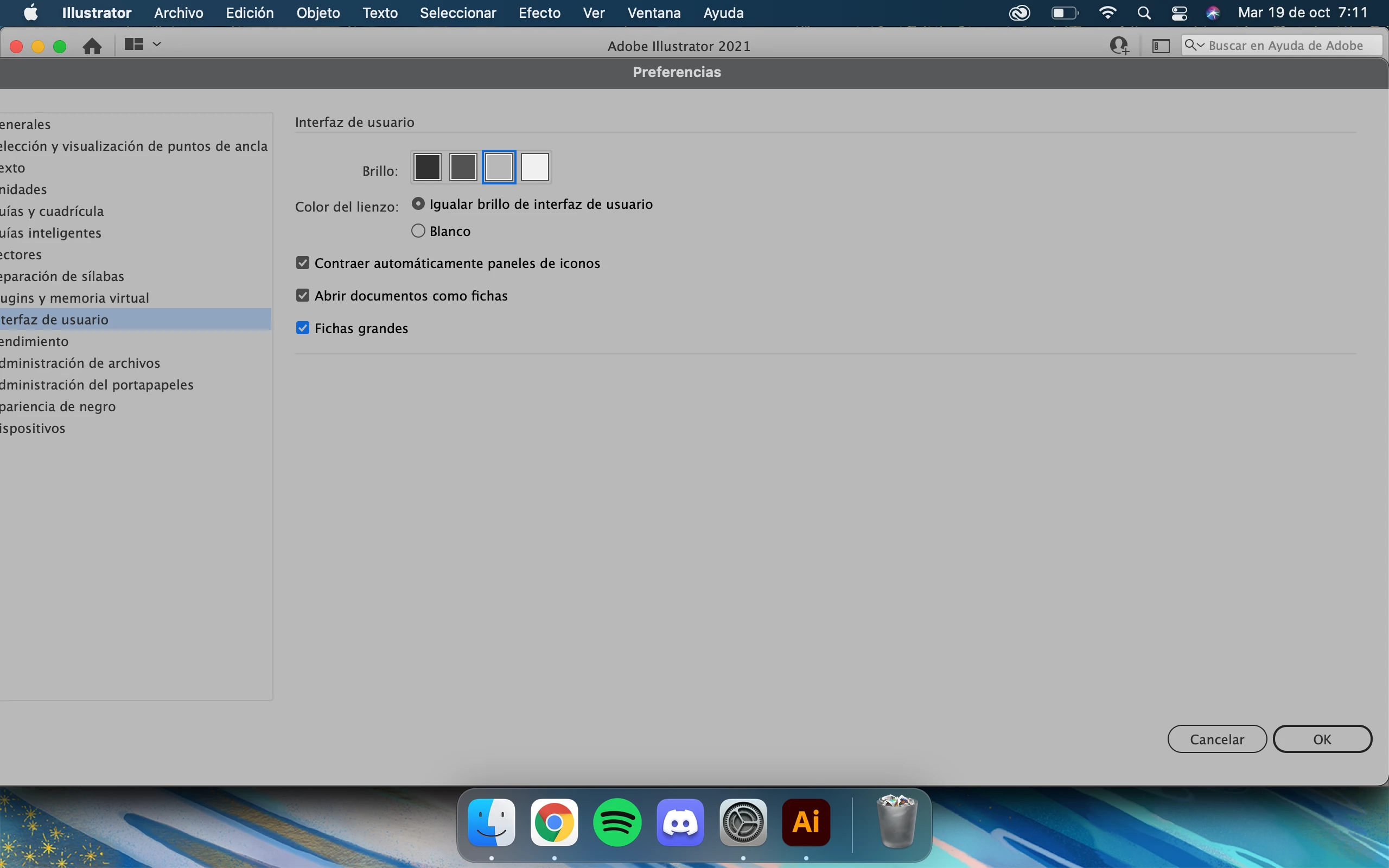
I'm new to Adobe world and I'm taking some Adobe Ai courses. Thing is when I open the preferences menu to edit the UI, be it scale down the icons or change the interface colour, the window pop up itself is too big and won't let me resize it. 


I try to scale it down by dragging the corner but it makes that dull sound that the window cannot be selected. I can move it around and I actually have to because it's too big it goes off screen. Is there a way to resize this? It's riving me insane.


Thank you

(Also additional question, is there no UI scaling in Adobe Ai 2021??)

This topic has been closed for replies.

2 replies

Met1
Legend
October 19, 2021

Is this a new Adobe install? May need a prefs reset.

What happens if you minimize the Illy app window first, and then select prefs?

caelumxi
caelumxiAuthor
Participant
October 19, 2021

It is a first time install yeah, never had the program before. And nothing different happens with Ai minimised, the preferences window is still big and won't let me scale it down 

Met1
Legend
October 19, 2021

I'd try a pref reset.

If that doesn't work you might want to uninstall, run the cleaner tool, then re-install

https://helpx.adobe.com/creative-cloud/kb/cc-cleaner-tool-installation-problems.html

Monika Gause
Community Expert
Community Expert
October 19, 2021

How large is your screen?

Do you have anything special set up in System preferences about UI size?

Yes, there is UI scaling in Illustrator.

caelumxi
caelumxiAuthor
Participant
October 19, 2021

Hi Monika

My computer is a 12 inch macbook. I have also just deleted my whole computer, reset it to factory settings and installed the newest macOS Big Sur due to malware, so all the system preferences are at default right now. 

Monika Gause
Community Expert
Community Expert
October 19, 2021

12" may just be very small. I have a 13" and even that fits just barely sometimes.