
kevinb14640821
Participant
September 12, 2018
Answered

Print Preview Cuts off half of my banner

  • September 12, 2018
  • 2 replies
  • 1473 views

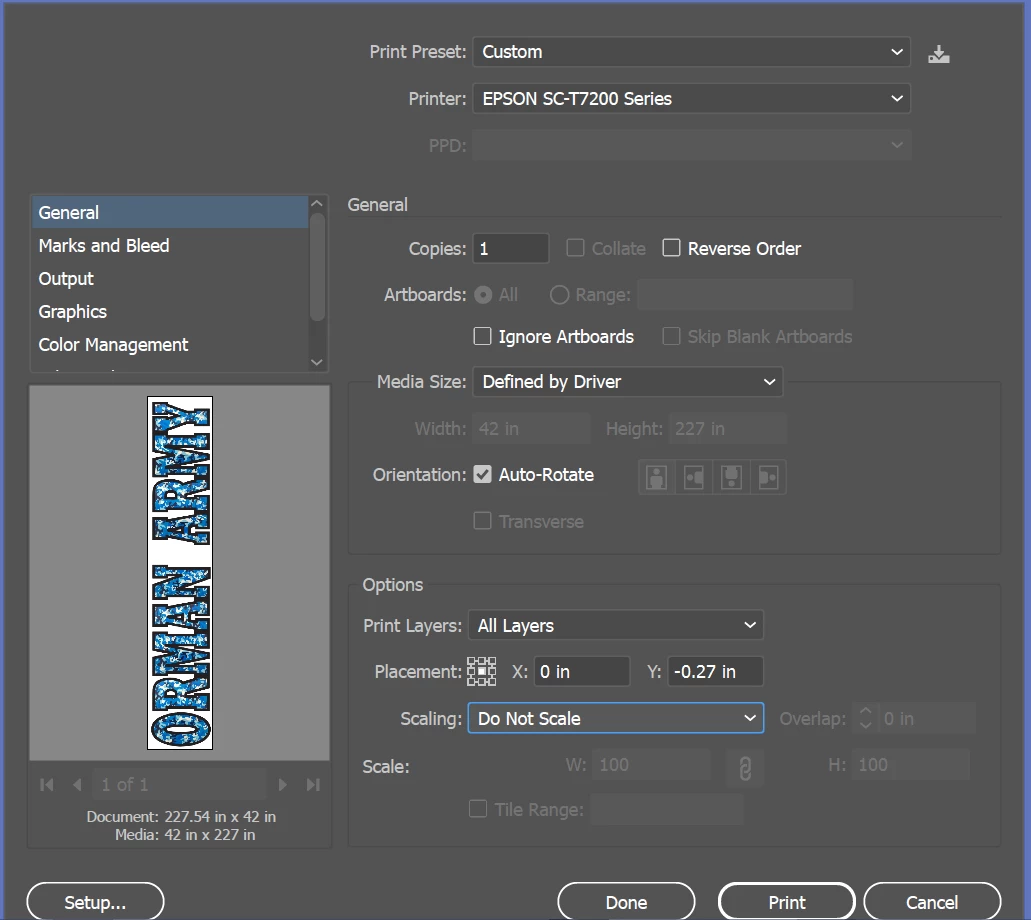
I am designing a banner that is 42in x 227in using Adobe Illustrator. Im printing on an Epson SureColor T7270 large format printer.

The image below is my settings, but when I click print and it pulls up the print preview the "print preview" cuts off my banner at about 96 inches. Not sure why
    This topic has been closed for replies.
    Correct answer Mario Arizmendi

    looks like u dont have a ppd for this printer installed, so if you can download the apropiate ppd from the epson website, then you need to click on the setup button and choose the correct size you need. Even check the media size window too

    2 replies

    Mario Arizmendi
    Mario ArizmendiCorrect answer
    Legend
    September 12, 2018

    looks like u dont have a ppd for this printer installed, so if you can download the apropiate ppd from the epson website, then you need to click on the setup button and choose the correct size you need. Even check the media size window too

    kevinb14640821
    Participant
    September 12, 2018

    Hey thanks, I did try fit to page and no success. I have changed the setting in the Epson PD (I have it). It is this Epson "print preview" that cuts my image. The AI thumbnail is correct.

    Inspiring
    September 12, 2018

    I'd suggest directly contacting Epson about this issue. Phone Support: (562) 276-1300 (Mon.-Fri.) 6am-8pm & Sat 7am-4pm)

    Inspiring
    September 12, 2018

    You may need to choose Scaling: Fit to Page.