
Inspiring
April 10, 2026
Answered

Print size view at 100% scaling too large in Illustrator

  • April 10, 2026
  • 1 reply
  • 53 views

Hello,

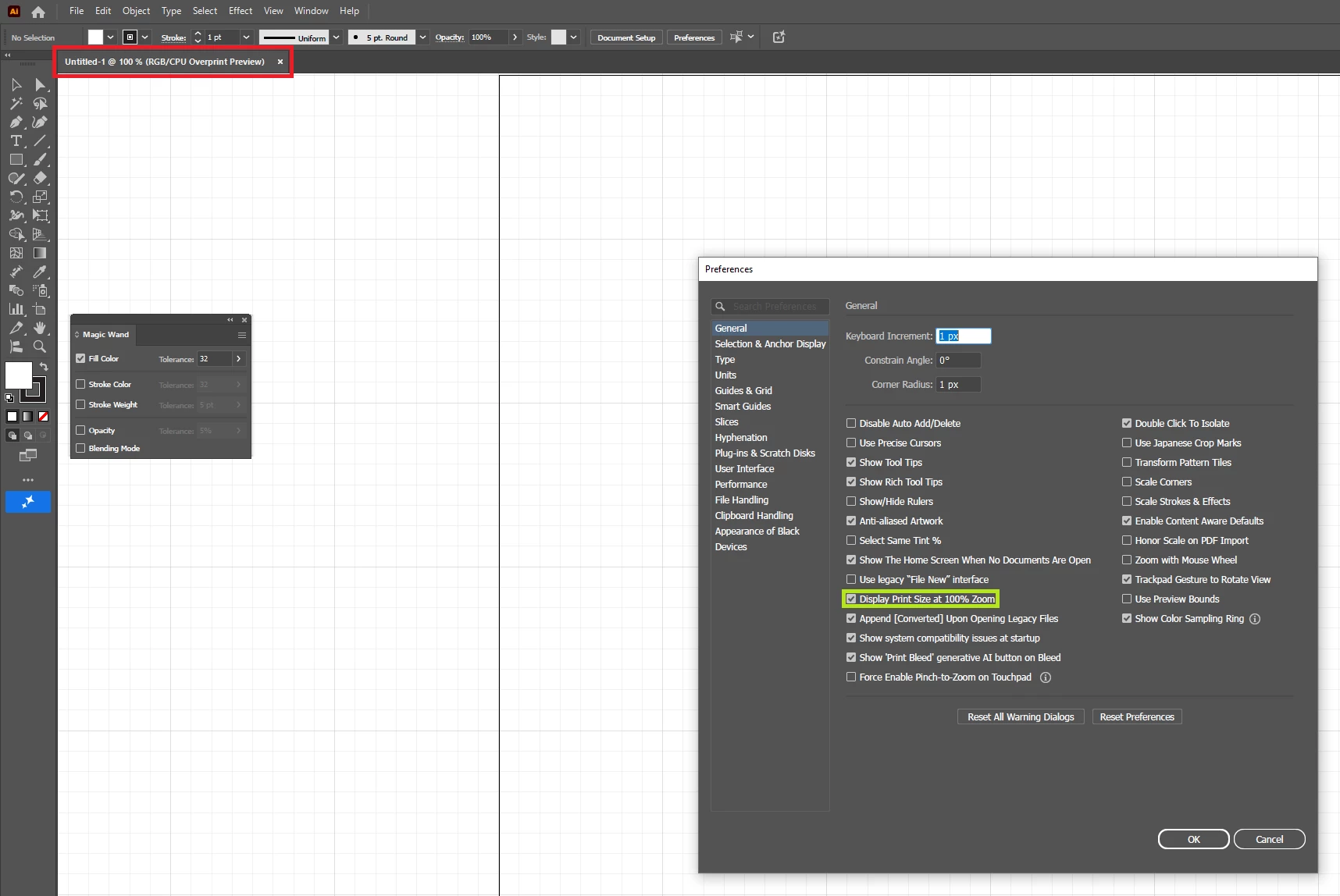
This latest version of Illustrator has some issues regarding the scaling. I usually work with 72 ppi; however it opens on default to this expanded size. Even when I toggle the option to “Display Print Size at 100% Zoom” it doesn’t really seem to make much difference. Any suggestions on how to fix this issue?
 

    Correct answer tngjstn

    @Ton Frederiks Hi Ton, it appears that this issue was resolved. I’ll let you know if it comes up again.

    1 reply

    Ton Frederiks
    Community Expert
    Community Expert
    April 10, 2026

    @tngjstn What do you mean by expanded size? This is showing Overprint Preview, which can be turned on/off in the View menu.

    Does this happen with any new document or with the ones based on your last created document?

    tngjstnAuthor
    Inspiring
    April 11, 2026

    Hello, I think I should further clarify that the artboard shown in the screenshot is 432 px X 432 px. It should not be as large as this when zoomed in at 100%. This issue happens with new documents as well as those created with previous versions.

    Ton Frederiks
    Community Expert
    Community Expert
    April 11, 2026

    What do your rulers show? In centimeters?