


Inspiring
March 27, 2024
Question

Printer printing colors from illustrator off
  • March 27, 2024
  • 2 replies
  • 234 views

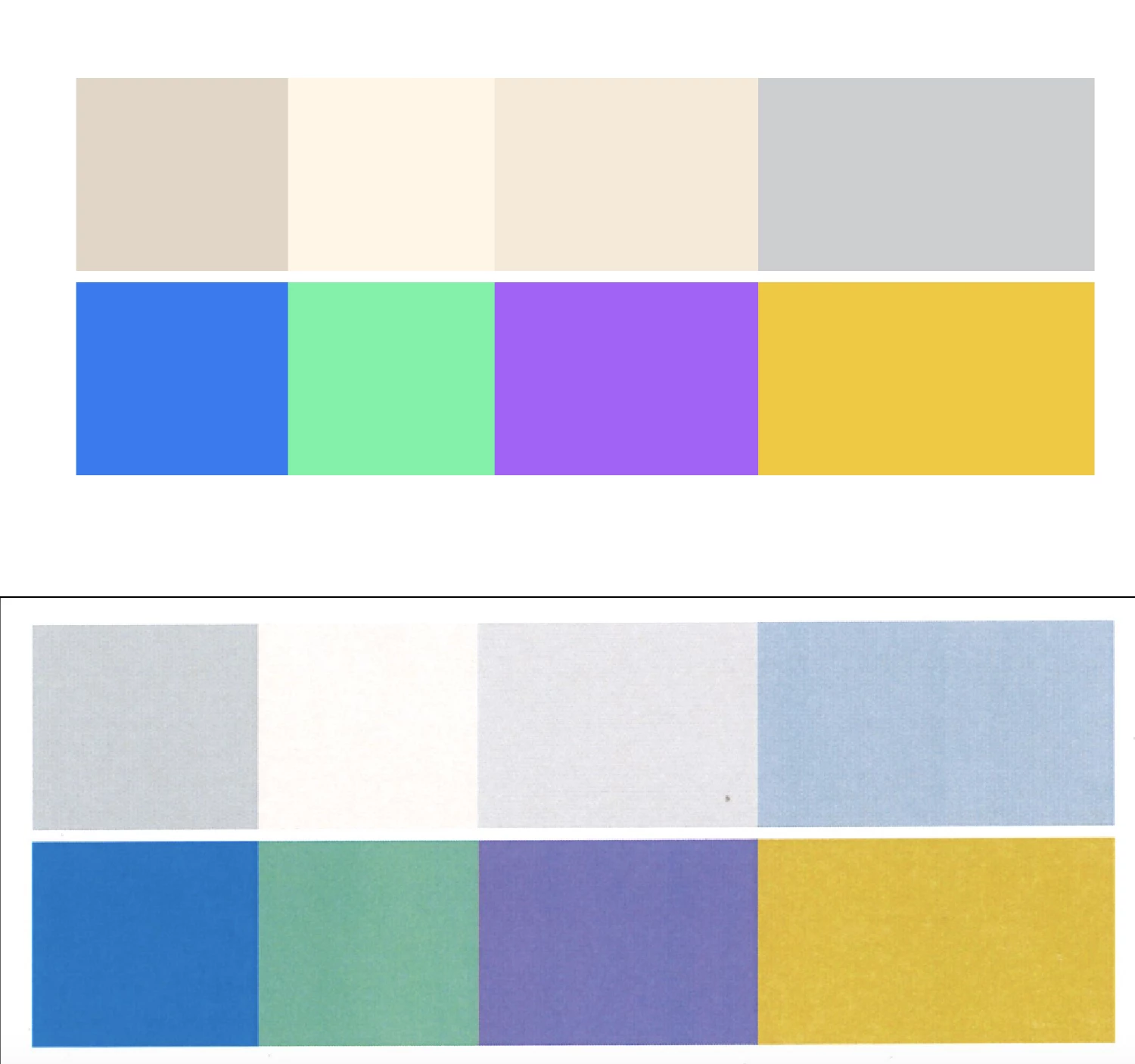
The above set of colors is the colors i'm using in illustrator, the bottom set is a print out, then scan of the colors that came out. Is there a way to get these colors to match up more when printed? I'm printing from a Ricoh C4504ex PS printer, and using a Macbook 14. In my print dialog box I have "let illustrator determine colors" checked, and under printer options<color matching, it's checked colorsync, Profile:Ricoh C4504ex. Thanks for any suggestions. 

This topic has been closed for replies.

2 replies

Monika Gause
Community Expert
Community Expert
March 28, 2024

Is your color management set up correctly? So that what you see on screen better matches the output?

Then also: The bottom row consists of some very bright colors that cannot be printed. What the printer did there was the best that was possible.

As for the color shifting: you might need to set up the printer better. Make a profile for it your self, turn off its internal color adjustments, whatever the manual suggests.

Inspiring
March 28, 2024

I'm not sure if my color management is set up correctly, how do I do that?

I know the printer can't print things that brightly, i'm mostly concerned about the more neutral tan colors that are printing as gray instead. 

Monika Gause
Community Expert
Community Expert
March 28, 2024

Here's a rather basic introduction to color management: https://helpx.adobe.com/photoshop-elements/using/setting-color-management.html 


A lot of printers have some kind of solor correction built into the driver. Can you turn that off? Also: the color might be affected by the paper type choice. Can you also outrule that the printer does that kind of adjustment?

Inspiring
March 27, 2024

Also, i've tried printing across multiple apps, tried switching from cmyk to rgb, tried different printer profiles under color managements and even sent the file to someone else and had them print it from their computer and the tan colors still come out as grays. This makes me thing it's an issue in the printer settings but I don't know how to change those or check them.