
Participant
February 25, 2023
Answered

Problem w coloring outline

  • February 25, 2023
  • 3 replies
  • 665 views

Hi all,

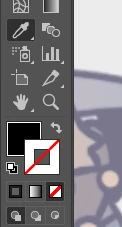
i have a problem that when i draw a figure and want to change the outline color using the tool that is selected in the image (i don't know wthat it's called in english) what changes is the color inside the figure i'm working on.


Then if i try to color the inside and then switch that color to the outline it allows me but if i try to then choose another color for the inside now that i have the color i want in the outline, i use the tool but it switches the outline back to no color at all and the inside changes to the color i selected.


Idk if this makes any sense but i did my best to explain. Plz help 😞 i´m on desktop and already tried closing and opening the app, installed the new update and even turn off my laptop for a while and coming back and it happens the same 


This topic has been closed for replies.
Correct answer Monika Gause

So you want to pick up a color for the stroke from somewhere using the eyedropper tool?

Press shift when you click on that color with the eyedropper

3 replies

Monika Gause
Community Expert
Monika GauseCommunity ExpertCorrect answer
Community Expert
February 25, 2023

So you want to pick up a color for the stroke from somewhere using the eyedropper tool?

Press shift when you click on that color with the eyedropper

Participant
February 25, 2023

omg this worked thx u so much

Jacob Bugge
Community Expert
Community Expert
February 25, 2023

Emma,


Just to make sure:


Your screenshot shows the hollow Stroke box activated because it is in front, and it is set to None; you ought to be able to change it to either Color or Gradient straight away by clicking the desired one.


The Fill can only be activated if you click it so it in front; and then you ought to be able to change the colour straight away by picking/selecting a colour in one of several ways, or switch to  it to either Gradient or None by clicking the desired one.


Are things working that way, or failing?


Participant
February 25, 2023

Another thing idk if it has to do with it but next to my ehh mouse epointer idk how to call it when i select a figure there's like a little rectangle with dots and i´m not sure how it got there help