Known Participant
April 15, 2018
Answered

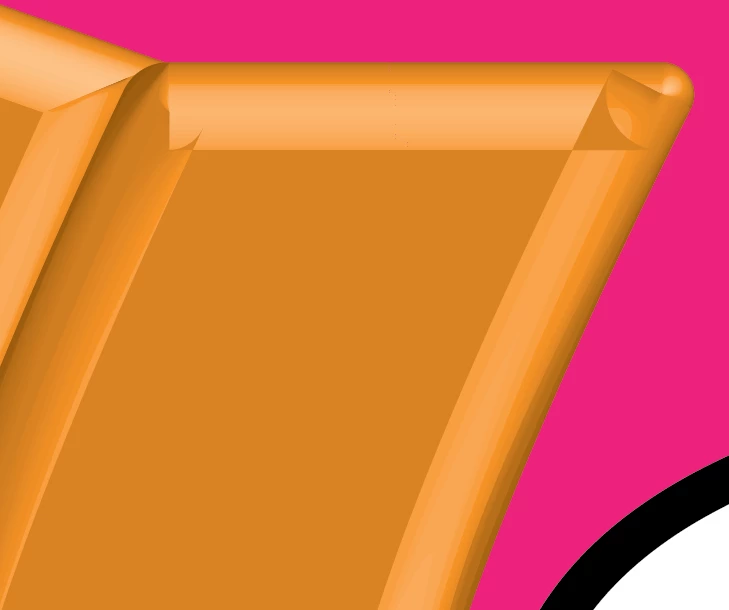
problem with 3d effict Illustrator 2018

  • April 15, 2018
  • 3 replies
  • 927 views

Hi

I do 3d effect to shape and use bevel>

after that  I change corner for shape

it's happen problem in the corner

the corner is distortion

What is the solution؟
[Moved from the non-technical Lounge to the specific Program forum... Mod]

[Here is the list of all Adobe forums... https://forums.adobe.com/welcome]

    This topic has been closed for replies.
    Correct answer angie_taylor

    Change the shape of the corner before applying g the the 3D Bevel & Extrude. When you apply it, switch on the Preview checkbox and make sure you do not ha e any overlap in the bevel. If you twirl

    down Advanced options you will see the options for the bevel there. Experiment with them

    till you get what you need

    3 replies

    Kat Gilbert
    Legend
    April 15, 2018

    3D is a master of deception. Thus the name of perception in a world that is only touched by visual promises. Ps, Dn or Ae and many of the other apps out there that could give you the desired results or at close to what you seek.

    I jest when I say all this but to be totally truthful not all aspects of 3D in one program will give you all the aspects that you seek. It is a varied arena that is encompassed by many. Remember that 3D on a 2D plane is not true ...

    Illustrator is working on expansion of 3D so put in a feature request for what you wish for this app to accomplish.

    Known Participant
    April 15, 2018

    Please..I need an answer

    I'm tired of updating this page

    angie_taylor
    angie_taylorCorrect answer
    Legend
    April 15, 2018

    Change the shape of the corner before applying g the the 3D Bevel & Extrude. When you apply it, switch on the Preview checkbox and make sure you do not ha e any overlap in the bevel. If you twirl

    down Advanced options you will see the options for the bevel there. Experiment with them

    till you get what you need

    Known Participant
    April 15, 2018

    Give me a picture to understand better.!

    Also when I adjust the corners first. Then I do expand, then I do 3d effect,

    it still the same problem

    Ares Hovhannesyan
    Community Expert
    Community Expert
    April 15, 2018

    You talk about left corner? How you change it? Also can you send a picture of a whole object in outline mode also?

    Known Participant
    April 15, 2018

    I changed it by the new method. From the corner .

    The problem found In all corners.

    And this is the picture you requested .