
Piter1288
Inspiring
May 19, 2022
Answered

[Problem with Blend] Replace spine does not align correctly

  • May 19, 2022
  • 2 replies
  • 933 views

Hello fellas,


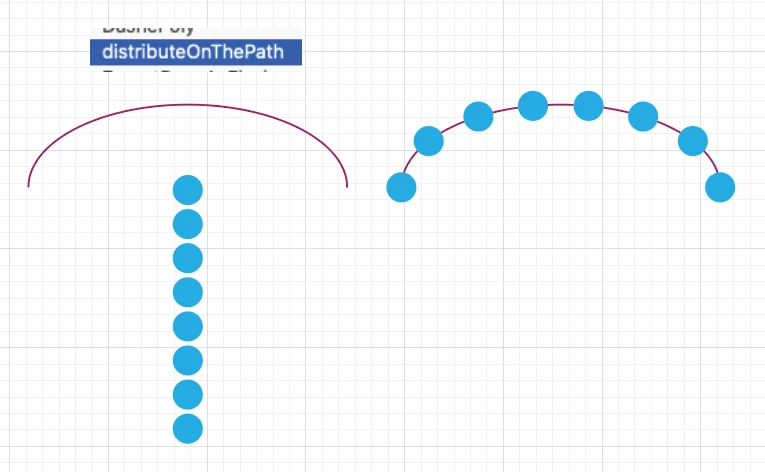
This is really simple, I want the circles aligned to a path but when I replace that spine this is how it does it: https://recordit.co/F1nil1o38m 


I've tried both orientations but it does not change anything.
This topic has been closed for replies.
Correct answer kphotopage

Piter, Hi

You could try this script, Distribute on the Path.


I found that script here. 

Link removed by moderator, Vectorboom looks now suspicious. Here are alternative places:

https://github.com/shspage/illustrator-scripts/tree/master/etc

https://github.com/marcusguttenplan/adobe_scripts/blob/master/distributeAlongPath.jsx


K

2 replies

kphotopage
kphotopageCorrect answer
Legend
May 20, 2022

Piter, Hi

You could try this script, Distribute on the Path.


I found that script here. 

Link removed by moderator, Vectorboom looks now suspicious. Here are alternative places:

https://github.com/shspage/illustrator-scripts/tree/master/etc

https://github.com/marcusguttenplan/adobe_scripts/blob/master/distributeAlongPath.jsx


K

Piter1288
Piter1288Author
Inspiring
May 22, 2022

Thank you very much! This is definitely what I was looking for, worked like a charm!

Monika Gause
Community Expert
Community Expert
May 19, 2022

The length of the path handles of the spine make this. So you need to adjust them.

Piter1288
Piter1288Author
Inspiring
May 20, 2022

Not sure what you mean, I've tried tweaking my spine path in several ways and even removed the handlers but I still get an uneven result:: https://recordit.co/vmIAYFy437

Monika Gause
Community Expert
Community Expert
May 20, 2022

I mean this:

uneven length of handles:


More even length of handles: better, but still not good of course: