Participating Frequently
April 18, 2022
Answered

Problem with bounding box

  • April 18, 2022
  • 2 replies
  • 585 views

Hi again,

I've noticed this happened to my objects when I moved them. this happened after I changed to CPU view mode(also unboxing GPU performance), I did that because of my old problem, here's the link https://community.adobe.com/t5/illustrator-discussions/please-help-with-this-edge-issue/m-p/12882108#M318495 
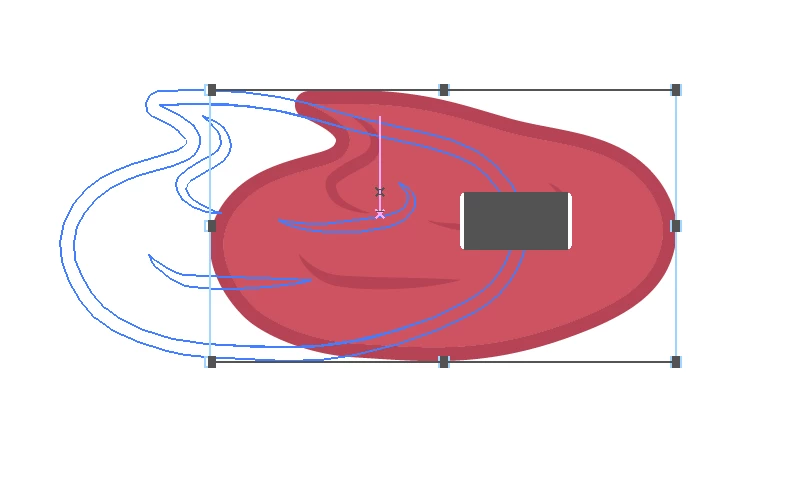


So, is it normal? or any suggestion?, because it's just so annoying


Thank you in advance!

This topic has been closed for replies.
Correct answer pixxxelschubser

@Nitchayapa88 

if I understand you correctly:

the Realtime Drawing during moving is only possible with GPU support. That is, no GPU preview - no Realtime Drawing while moving selected objects. Then you will see only the contours of the moving object while moving.


2 replies

pixxxelschubser
Community Expert
pixxxelschubserCommunity ExpertCorrect answer
Community Expert
April 18, 2022

@Nitchayapa88 

if I understand you correctly:

the Realtime Drawing during moving is only possible with GPU support. That is, no GPU preview - no Realtime Drawing while moving selected objects. Then you will see only the contours of the moving object while moving.


Participating Frequently
April 19, 2022

So you mean, if I want to see Realtime Drawing, I should back to GPU preview, right?

Monika Gause
Community Expert
Community Expert
April 19, 2022

Correct. Realtime preview is only available with GPU rendering

Monika Gause
Community Expert
Community Expert
April 18, 2022

So your objects stay that way after moving?

Participating Frequently
April 19, 2022

No, it doesn't stay like this after moving. It was like this whlie I was moving the object, I just captured to show what it's like while moving it.