Participant
July 15, 2019
Answered

Problem with filling of objects

  • July 15, 2019
  • 3 replies
  • 377 views

Hi,

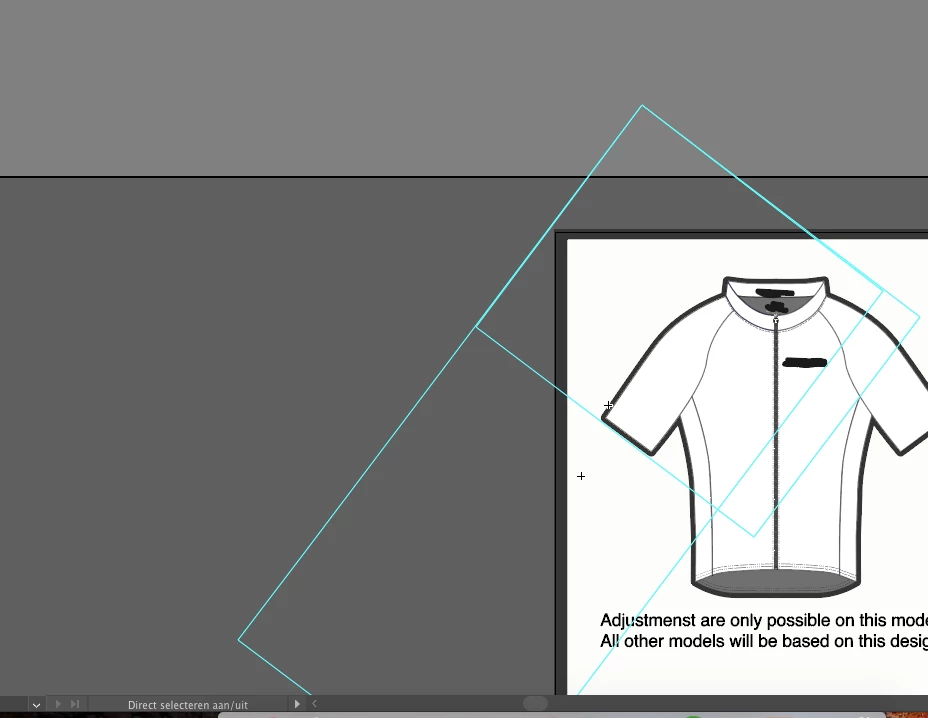
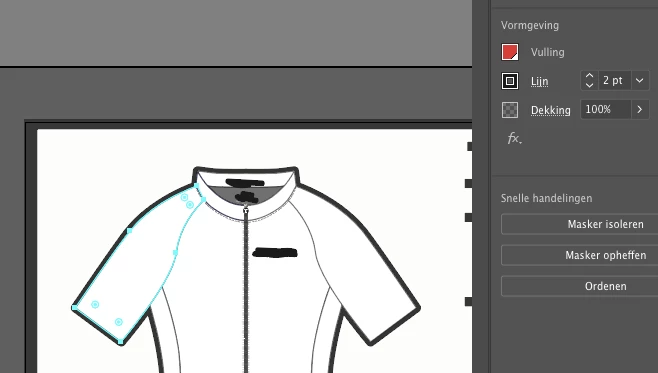
I received a template to design a sport shirt but when I try to fill the parts with a color, nothing happens (see the first picture, where I try to make a red sleeve).

If I double click on a part of the shirt (like the sleeve), a square appears like in the second picture.

I'm a beginner with AI, so does anyone know why I can't color up the parts just like any other objects?

Thank you!

(I use the latest version of AI CC)
    This topic has been closed for replies.
    Correct answer randyd66331838

    Thank you for all your help. I think, I found the problem.

    The first time I downloaded the file from my mail and now I copied the file direct into AI.

    With the direct selection tool, it is now possible to color up the parts! I even have a lot of default swatches.

    Thank you!

    3 replies

    meganchi
    Legend
    July 15, 2019

    Can you share the file so we can troubleshoot it?

    randyd66331838AuthorCorrect answer
    Participant
    July 15, 2019

    Thank you for all your help. I think, I found the problem.

    The first time I downloaded the file from my mail and now I copied the file direct into AI.

    With the direct selection tool, it is now possible to color up the parts! I even have a lot of default swatches.

    Thank you!

    meganchi
    Legend
    July 15, 2019

    Thank you for the outline preview mode pic. OK, use your direct select tool and in the outline preview mode, click on the shape that you want to change the color on. Then, preview normally again with that shape selected and choose a color.

    You will need to do this for each part of the shirt that you want to change colors to. It looks like their may be some gradient mesh or blending artifacts that you accidentally selected because you double-clicked with the group select tool.

    Please let us know if this works.

    Participant
    July 15, 2019

    Thank you for the detailed answer. Unfortunately it doesn't work...

    Do you have another idea?

    Thank you in advance!

    meganchi
    Legend
    July 15, 2019

    Can you please show us a pic of the art in outline preview mode?

    Participant
    July 15, 2019

    Of course!