Participating Frequently
August 26, 2010
解決済み

Problem with rotate function.

  • August 26, 2010
  • 返信数 1.
  • 1909 ビュー

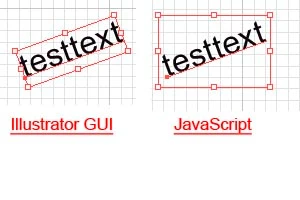
I got a problem with the rotate function. When I rotate an (text) object (point text but same behavior with area text) on the GUI of Illustrator, the resize bounds around (see screenshot) is rotated as well so that you can resize it as used to. If I rotate the same object by JavaScript, the resize bounds are NOT rotated along with. How can I get the same effect as with the GUI-way by JavaScript as thats the result I need? And where is my thinking error. Here is the code I used for the rotation:


var docRef = app.activeDocument;
var sRef = docRef.selection[0];

sRef.rotate(20, true, true, true, true, Transformation.TOPLEFT);
このトピックへの返信は締め切られました。
解決に役立った回答 schroef

@Jens_D_ 

@CarlosCanto 

after some tinkering, i think i perhaps have found a solution for the bounding box issue. The way we can keep it, is by also adding tags. I tried using them seperate, but adding tags by themselves doesnt work. Thats why i run the rotate function as well.


I first got that tags name by running it on an object which had rotation. first i though what a weird name, but BB probably stands for BoundBox


var doc = app.activeDocument;
if (app.documents.length > 0) {
    for (var i = 0; i < doc.selection.length; i++) {
        
        var ob = doc.selection[i]
        tags = ob.tags;
        tags.add()
        ob.tags[0].name = "BBAccumRotation"
        var pi = Math.PI;
        // var degrees * (pi/180);
        // ob.tags[0].value = (10* 180 / Math.PI)
        ob.tags[0].value = 10* (pi/180);
        ob.rotate(ob.tags[0].value * 180 / Math.PI, true)
}
}


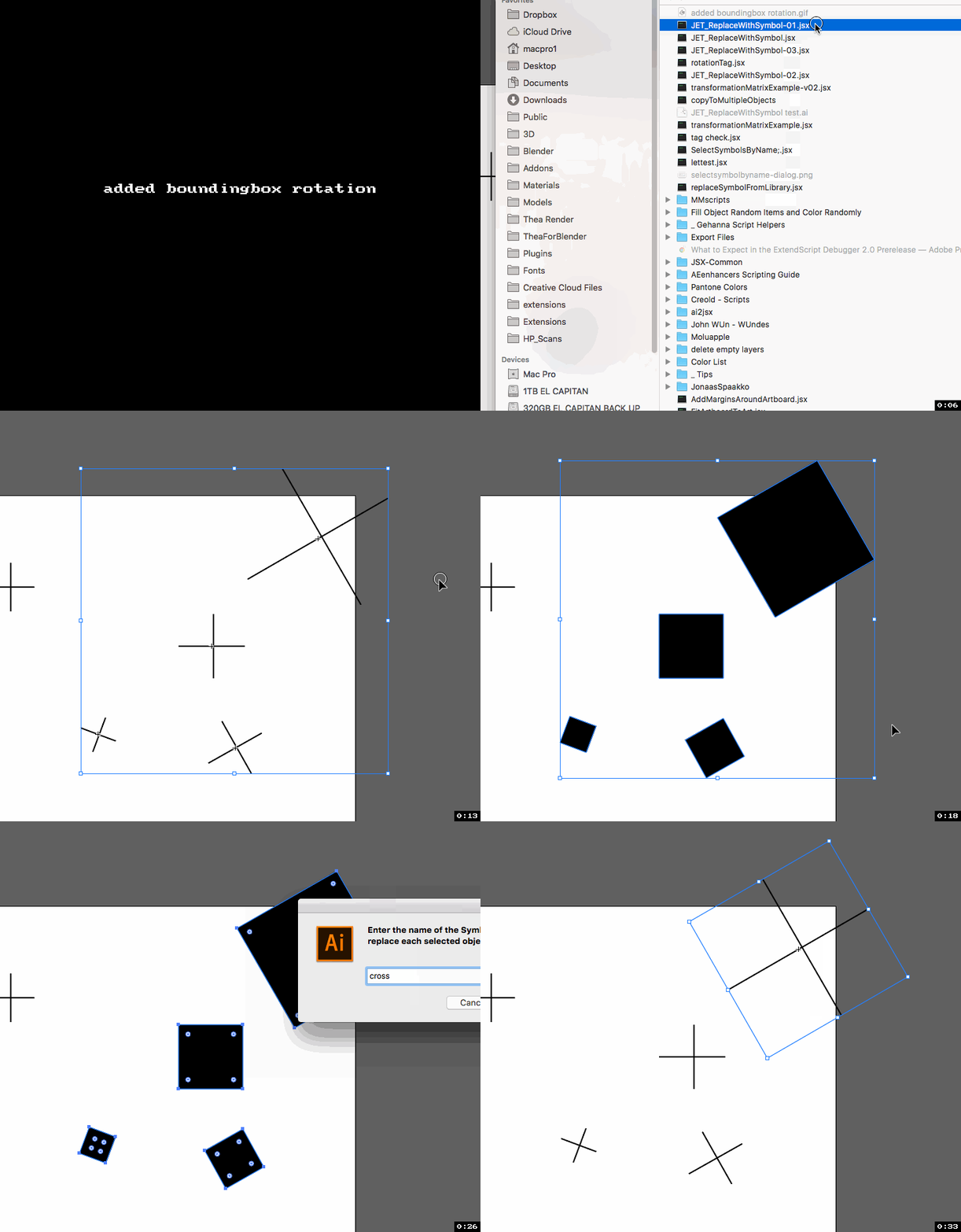
I quickly made a screengrab showing the difference. This was for a script replace objects with a symbol and also apply rotation. I wanted to keep how the boundingbox shows, thats why it doesnt show with either transformation matrix or rotate function

返信数 1

CarlosCanto
Community Expert
Community Expert
August 30, 2010

Hi Jens, I had the same problem, no matter what I tried, rotating via scripting keeps resetting the bounding box. I resolved it by recording an action to rotate the object, same results as if rotated manually. If you still need to rotate via scripting, VBS and AppleSript can execute Actions from script, JS can not.

Jens_D_作成者
Participating Frequently
August 31, 2010

Hello CarlosCanto, thats bad news because I cant use an action as the angle to rotate the objekt ist determinend at runtime ... as well as I have to use javascript for the integration of several scripts together ...

schroef
schroef解決!
Inspiring
April 20, 2023

@Jens_D_ 

@CarlosCanto 

after some tinkering, i think i perhaps have found a solution for the bounding box issue. The way we can keep it, is by also adding tags. I tried using them seperate, but adding tags by themselves doesnt work. Thats why i run the rotate function as well.


I first got that tags name by running it on an object which had rotation. first i though what a weird name, but BB probably stands for BoundBox


var doc = app.activeDocument;
if (app.documents.length > 0) {
    for (var i = 0; i < doc.selection.length; i++) {
        
        var ob = doc.selection[i]
        tags = ob.tags;
        tags.add()
        ob.tags[0].name = "BBAccumRotation"
        var pi = Math.PI;
        // var degrees * (pi/180);
        // ob.tags[0].value = (10* 180 / Math.PI)
        ob.tags[0].value = 10* (pi/180);
        ob.rotate(ob.tags[0].value * 180 / Math.PI, true)
}
}


I quickly made a screengrab showing the difference. This was for a script replace objects with a symbol and also apply rotation. I wanted to keep how the boundingbox shows, thats why it doesnt show with either transformation matrix or rotate function