Si, pero sigue sin funcionarme, aún cuando tengo la app autorizada al acceso de la wacom
Hello @Tatiana24649763a4fp,
Sorry for the late response. I hope the problem is resolved by now. If not, I would request you try manually deleting the preferences for Illustrator by following these steps and share your observations with us:
- Close all Adobe applications.
- Go to the following locations
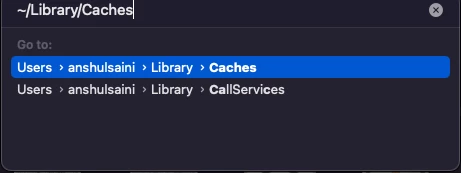
~/Library/Caches
~/Library/Application Support/Adobe
~/Library/Preferences
- Rename Adobe Illustrator, com.adobe.illustrator and Adobe Illustrator 26 Settings folders to Adobe Illustrator. old, com.adobe.illustrator.old and Adobe Illustrator 26 Settings.old
- Launch Illustrator from the Creative Cloud.
Note: Location starting with this "~" sign indicates the User Library, which is hidden. So, you need to copy & paste the exact path in spotlight search or from Finder Menu > Go > Go to Folder > Paste the location in the dialog box like this:
Disclaimer: Please note that renaming preferences folders will remove all the custom settings, and Illustrator will launch with default settings. You can also take a backup of the folders in case you want to. The location is mentioned above.
Also, try removing and re-installing the drivers for your Wacom Tablet from here: https://www.wacom.com/en-in/support/product-support/drivers
Looking forward to hearing from you.
Thanks,
Anubhav
Note: Marking correct for visibility.

 AdChoices